





Best Of
Re: My Acer A515 51G wont charge the battery, I have a new battery and new charger
The charging problem in your 2017 Aspire A515-51G is NOT only because of the battery or adapter/charger, it could be the main power rails and its BQ chip or voltage regulator, a mosfet, a capacitor or a resistor that are shorted and faulty and need pinpointing and replacing. Get your laptop analysing by an experienced Technion, but if you can't do that then change this laptops mainboard for either a used working one or a new one, as they not expensive and could be cheaper if you buy a working board and swap the board yourself.
As to fix a locked battery you also need a special tool called an NLBA1 Laptop Battery Analyser which aint cheap and not many techs have one of these to use or to unlock a battery that is locked due to the batteries mainboard soldered fuse shortening out, which is another thing that a tech needs to analyse and fix. As an experienced technician that can fix a power related faulty laptop will fix this mainboard and unlock its battery of your A515-51G also and make it work.
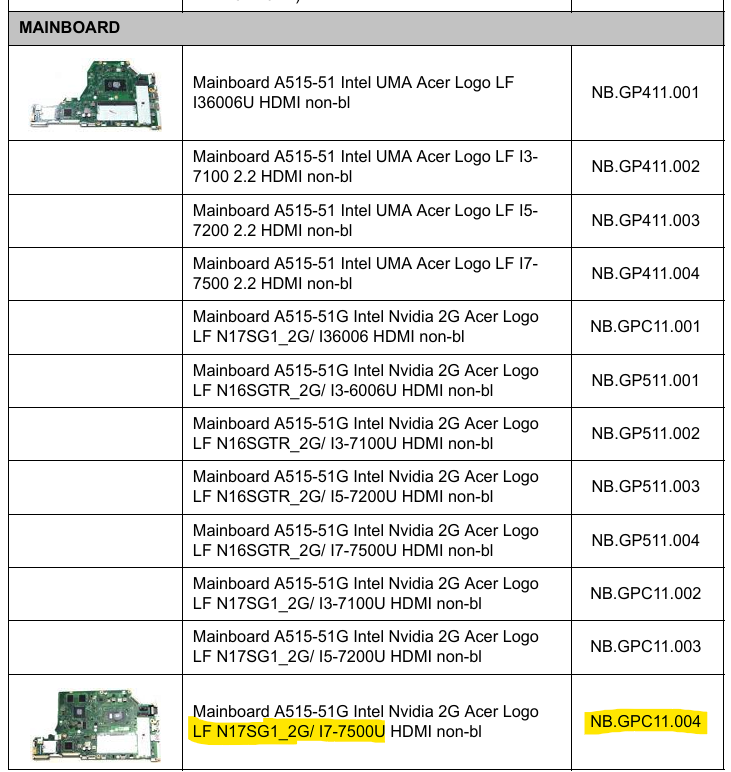
I don't know what is the exact specifications of your Aspire A515-51G laptop, but below are all mainboards that Acer fitted to this laptop and its top spec boards. I suggest that if you buy a new mainboard, you upgrade to the top spec A515-51G board Acer part#: NB.GPC11.004 which there is one for sale on eBay for US $242.28 + FREE shipping with the i7-7500U cpu and the NVidia MX150 2GB gpu, that I've highlighted below from the Aspire A515-51GT laptop. Good luck and hope this helpas you out.
If this answers your question and solved your query please "Click on Yes" or "Click on Like" if you find my answer useful👍

Re: A way to fix thermal throttling on Nitro AN515-43 after BIOS Update?
 batmalin
Re: What are the specific specs for RAM and SSD for Aspire A515-54 series - A515-54-51CM?
Hi ManuelJordan and I'm glad to answer your question above, as the answers to your question above are as follows:
- Is viable remove the 2 sticks of RAM? Or one is soldered? - In the Aspire A515-54 there is no soldered internal ram, this laptop has 2x ram slots for removable ram, bets is to populate the 2x ram slots with a kit of equally matched memory modules at max 2x 16GB DDR4-2400MT/s for the 8th Gen cpu's and DDR4-3200MT/s CL22 for the 10th Gen cpu's speed ram.
- Can be used DDR4L instead of DDR4? - Use ONLY normal 1,2V DDR4 ram modules, you don't need the DDR4L which runs at a lower voltage, as DDR4 is the most common and cheapest ram available and what the Aspire A515-54 laptop is designed for
- What is the MHz required? - use the Acer max speed recommended which is the DDR4-2400MT/s ram for the 8th Gen cpu's and DDR4-3200MT/s CL22 normal ram that the 10th Gen cpu is designed for.
- What is the maximum RAM capacity? 32G? (2*16) - the max ram in these laptops is governed by its cpu specs and what the cpu's max memory specs are, which in the Aspire A515-54 it depends which cpu your laptop has, as some A515-54 came with either the Intel i5-8265U or the i7-88565U cpu's which have a max Intel memory design of 64GB at max DDR4-2400 or the soldered ram LPDDR3-2133 (which your A515-54 doesn't have) or the higher end cpu's of this laptop the i3-1005G1 or i5-1035G1 that have a max ram capacity of 64GB at the higher 2x 32GB DDR4-3200 CL22 or for soldered ram of LPDDR4-3733 (which your A515-54 doesn't have)
- With your Aspire A515-54 M.2 SSD drive, I suggest that you upgrade to a drive like a PCIe 3 x4 lane from Western Digital model NS350 Green that comes in either 1TB or 2TB capacities, as that is the most compatible and best and most speedy drive to upgrade to, you don't need to spend more money on an M.2 SSD drive like a Gen 4 x4 lane drive as it will be a waste of money and it will not improve drive speed.
My recommendation is as follows. if you have the 8th Gen cpu in your Aspire A515-54 laptop for max ram, is to upgrade to 2x 16GB DDR4-2400MT/s speed ram (NOT DDR$L) and if you have the Aspire A515-54 fitted with the higher end 10th Gen cpu's and for max ram capacity, is to upgrade to 32GB at 2x 16GB DDR4-3200MT/s CL22 type ram for best results. Good luck and hope this helps you out further in your upgrade f this laptop.
If this answers your question and solved your query please "Click on Yes" or "Click on Like" if you find my answer useful👍
Re: Acer Switch Alpha 12 - screen popping out
Yes, as a "Phone repair shop than a computer repair shop??" has the tools to open these fixed tables as they are the same as an iPads or smartphones and they do those all the time, and changing a battery is a pretty simple process.
If your Aspire SA5-271 was released by Acer with the Microsoft® Windows® 10 64-bit OS, and as your version has the i7-6500U cpu and the 8GB LPDDR3 SDRAM soldered internal ram, and if you have updated it to Win-11 and it runs Win-11 then fine, as its strange when Microsoft specifically specifies that only an 8th Gen cpu with a TPM 2.0 version board can run Win-11. Anyway this is all I can help you out with, if you have any other question that you need, just ask. Good luck and hope this helps you out.
If this answers your question and solved your query please "Click on Yes" or "Click on Like" if you find my answer useful👍
Re: AN515-45 Thermal throttling in games only after reapplying heatsink, clean windows Install worth it?
You have to follow this guide's step 5. (Do thermal repasting and clean like shown if you didn't).
https://community.acer.com/en/discussion/724763/ultimate-laptop-cooling-optimization--guide.
There is important warning in guide which is your answer:
Never remove or open the heatsink after applying and securing new thermal paste. Removing it breaks the thermal paste seal, creating air bubbles or voids that cause overheating.
So, Now you have repaste.

Re: Where did the Silent, Normal and Perfomance profiles go in Acer Sense home screen?
I am having the same issue. However, if you press fn+f it should still allow you to cycle though the fan settings
 TSpin
TSpin
Re: Acer Predator PO3-600 PO3-600 Power Supply
Yes — that PSU will work for your planned upgrade ✅
- Main & CPU power: Standard 24‑pin ATX + single 8‑pin EPS covers most AM4 mATX boards for the Ryzen 5 3600.
- GPU power: PCIe 6+2 pins handle your current GPU; no changes needed unless you move to a high‑draw model later.
- Form factor: If your case accepts mATX, the board will bolt in without PSU fit issues.
- BIOS note: Pick a board with Zen 2 support out of the box, or be ready to flash BIOS using an older CPU or BIOS Flashback.
- Final check: Visual pinout match before first boot, just to be 100 % safe.
 Puraw
Puraw





