





Best Of
Re: Do I need to remove stock SSD Heatsink to Install Adata Legend 900 on Nitro an515-57?
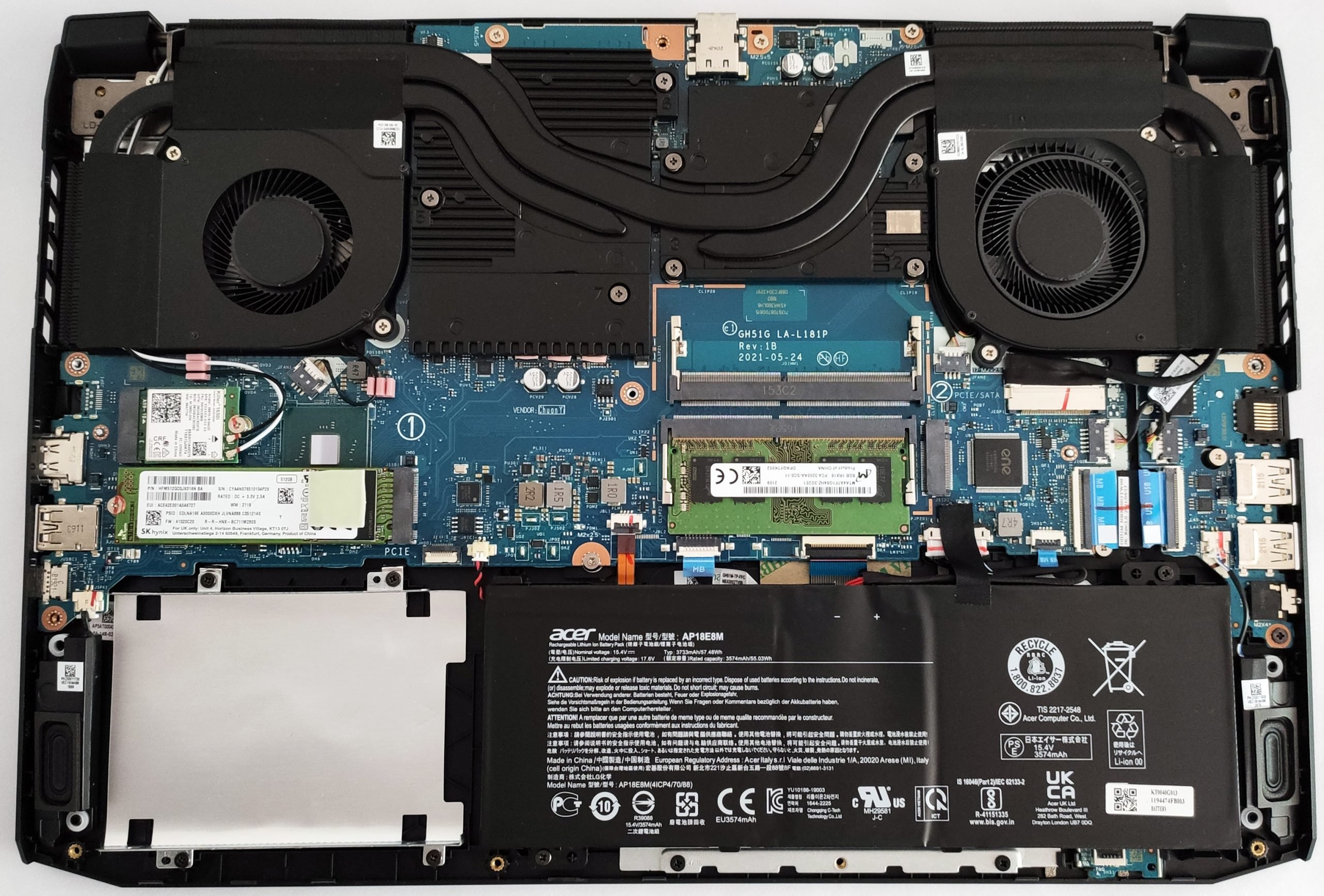
Hi, this picture does not show a heatsink in the AN515-57 but if your model has an SSD heatsink you should remove it as the SSD will be two thick with 2 heatsinks. I don't recommend to remove the heatsink that came with the Adata SSD.
 Puraw
Puraw
Re: Acer Nitro n50-640 desktop not powering ON. How to make it start up?
Hello!
After trying a power drain and reseating the RAM, the next step is to check the power supply and internal connections. The problem is likely either a faulty power supply unit (PSU) or an issue with the motherboard. First, check that the PC is plugged into a working outlet and that all cables inside the case are firmly connected, especially the ones from the PSU to the motherboard. You can also perform a paperclip test to see if the power supply is completely dead. If none of these steps work, it's very likely a component has failed, and you should contact Acer support, as your desktop should still be under warranty.

Re: Acer Nitro n50-640 desktop not powering ON. How to make it start up?
Hi Gentle_finn,
Sandra720Ben already covered the key basics—power drain, RAM reseat, and PSU check—but here are a few extra steps that may help revive your Nitro N50-640 desktop:
- Try a CMOS reset: Remove the coin-cell battery from the motherboard for 5–10 minutes, then reinstall. This clears any corrupted BIOS settings that might block startup.
- Check front panel connectors: Make sure the power switch cable from the case front panel is securely connected to the motherboard header. A loose or misaligned cable can prevent power-on even if the PSU is fine.
- Test with minimal hardware: Disconnect all drives, external peripherals, and expansion cards. Boot with just CPU, one RAM stick, and onboard graphics (if available). This rules out short circuits or faulty components.
- Try alternate RAM slots: Even if reseated, test each stick individually in different slots. A bad DIMM or slot can halt POST entirely.
- Tip: Wrap the paperclip in tape for insulation and avoid touching it while powered.
- Unplug the PSU from the wall.
- Remove the 24-pin connector from the motherboard.
- Bend a paperclip into a “U” shape.
- Insert one end into the green wire pin (PS_ON) and the other into any black wire pin (ground).
- Plug the PSU back in and flip the switch.
- If the PSU fan spins, it’s receiving power. If not, the unit may be dead.
- Check for motherboard LED or beep codes: If your system has diagnostic LEDs or a speaker header, note any patterns—they can point to RAM, GPU, or CPU faults.
If none of these steps work and the system shows no signs of life (no fans, no lights), it’s likely a motherboard or CPU failure. Since the N50-640 is relatively recent, Acer warranty support is your next best step.
Puraw
Re: Acer Nitro V 17 AI with Ryzen 9 365 REAL or NOT
This is a new model and these new NVidia and new Ryzen AI 9 365 cpu model that are not listed on the Acer site, this must be a specific Amazon model that Acer supplies to Amazon. The Nitro ANV17-61 was released at around 2025/05/16 and is listed on the Acer support site and has all the drivers and its had 3x bios version updates to latest version 1.07, so its a legit model, if that is what you are worried about.
If this answers your question and solved your query please "Click on Yes" or "Click on Like" if you find my answer useful👍

Re: Nitro ANV15-51 Cooling fan speed. Unable to adjust through Nitro sense
This is really concerning from Acer, that they have screwed over everyone who had installed the 1.26+ versions of BIOS, and as of now there is no fix. Lets just wait for the next update and maybe they will fix it, I don' t have much hope

Re: Laptop keep getting shut down on its own g3-572-58M1
- Update battery drivers.
- Press the Windows key + X and select Device Manager.
- Expand the Batteries section.
- Right-click on the "Microsoft ACPI-Compliant Control Method Battery" and select Update driver.
Check for software and driver issues
Corrupted drivers or system files can sometimes lead to instability and shutdowns.
- Disable "Fast Startup." This Windows feature can sometimes cause power-related conflicts.
- Search for and open Power Options in the Start Menu.
- Click Choose what the power buttons do on the left.
- Click Change settings that are currently unavailable.
- Uncheck the box next to Turn on fast startup (recommended) and click Save changes.
- Scan for malware. Run a full system scan using Windows Security or another reputable antivirus program.
Investigate hardware component failure
If the simpler fixes don't work, a more serious hardware issue may be to blame.
- Run a memory check. A faulty RAM module can cause system instability and crashes. You can use a free utility like MemTest86 to scan for errors.
- Check Windows Event Viewer. The Event Viewer may contain logs that can help pinpoint the cause of the shutdown.
- Press the Windows key + R and type eventvwr.msc.
- In the left pane, navigate to Windows Logs > System.
- Look for "Critical" errors labeled "Kernel-Power" around the time of the shutdown.
 Jack22
Re: Laptop keep getting shut down on its own g3-572-58M1
Unexpected shutdowns on the Acer Predator G3-572 often indicate a failing battery. For guidance on suitable battery models, refer to this discussion on the Acer Community for the G3-572 series :
Where can I find Battery for Acer Predator Helios 300 (G3-572) ? - Acer Community
Click on "Yes" if it answers your question or Click on "Like" if you find my answer useful
 Diya1811
Re: Task Manager shows wrong GPU after motherboard replacement on ANV15-41
What is your Nitro laptops exact model number, is it a Nitro like ANV15-xx or ANV16-xx, as that is important. With the Acer NitroSense App try to do this Acer fix at this link here “What to Do if NitroSense Software Will Not Start” and see if that fixes the problem.
Also, the GPU 0 and 1 being reversed makes no difference to the performance of the laptop, as matter of a fact, using the NVidia gpu is allot better than using the Intel cpu graphics. If your laptop is working and you can play games, there is nothing more that Acer can do, as Acer replaced your mainboard and reinstalled the Win-11 24H2 version OS and updated bios.
Also be aware that with these new Nitro V15 and V16 models, the NitroSense App is problematic and you need to look at the Acer community NitroSense fixes from other members and solutions there for the NitroSense App problems and see if that fixes the problems that you are having with your NitroSense App. Good luck and hope this helps you out.
If this answers your question and solved your query please "Click on Yes" or "Click on Like" if you find my answer useful👍
Re: acer nitro 5 an515 52 screen replacement
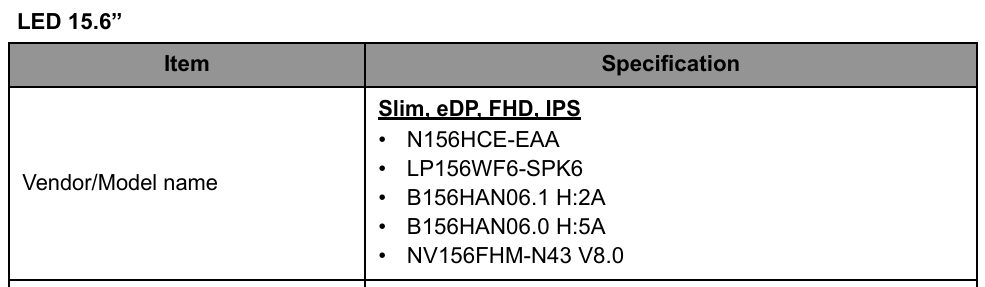
Acer did NOT fit a 120Hz refresher rate screen to the Nitro 5 AN515-52 model, they fitted only 60Hz screens with a 30pin video plug as listed below from this laptops SG.
If you want to upgrade to 120Hz then you can do that, as its a matter of plug and play as your oem screen has a 30pin eDP plug that the 120Hz refresher rate screen also has.
If you want to upgrade to a 144Hz screen, then you will need a 40pin eDP cable plug, then you will need to buy a 30pin to 40pin adapter so that you can upgrade the screen to a higher refresher rate. So this is what upgrading the screen entails and you need to do. Good luck and hope this helps you out.
The 120Hz screens that you listed above are here, so have a look at their specs:
Below are all the screens that Acer fitted to the AN515-52 model laptop.
If this answers your question and solved your query please "Click on Yes" or "Click on Like" if you find my answer useful👍





