





Best Of
Re: Request for Original BIOS File for Acer Aspire V3-571G (Q5WH LA-7912P)
Всё в порядке. Попробуйте сначала Q5WV1X64.fd. Если не получится, просто переименуйте файл в Q5WH1X64.fd и попробуйте ещё раз.
That's OK. Try Q5WV1X64.fd first. If it doesn't work, simply rename file to Q5WH1X64.fd and try it again.
 JackE
JackE
Re: Request for Original BIOS File for Acer Aspire V3-571G (Q5WH LA-7912P)
Извлеките файл Q5WH1xx.FD, запустив загруженный EXE-файл 1.xx на другом компьютере. Скопируйте файл FD на USB-накопитель с индикатором активности. Вставьте флешку в V3. Нажмите и удерживайте FN+ESC. Нажмите кнопку питания. Отпустите FN+ESC после того, как индикатор начнет светиться. В случае успеха светодиоды перестанут светиться примерно через 5 минут, и V3 автоматически выключится. Имейте в виду, что, по моему опыту, это срабатывает примерно в 25% случаев.
Extract the Q5WH1xx.FD file by running the downloaded 1.xx EXE file on another computer. Copy the FD file to a USB stick with an activity LED. Insert stick into V3. Press & hold FN+ESC. Press power button. Release FN+ESC after LED activity starts. If successful, LED activity will stop after about 5 minutes and V3 will turn off by itself. Be forewarned that this only works ~25% of the time in my experience.
JackE
Re: Request for Original BIOS File for Acer Aspire V3-571G (Q5WH LA-7912P)
The symptoms that you are experiencing is because your Aspire V3-571G bios chip programming is corrupted and needs to be either reprogrammed with a special bios reprogramming tool or replaced.
I suggest that you buy a new UEFI programmed with the version 2.21 bios chip and change the chip, this bios chips is available on eBay with the last UEFI bios version 2.21 included HERE and its only GBP 15.39 this is the simplest solution to solving this problem.
V3-571G last released UEFI BIOS version 2.21
V3-571G bios chip should look like this or similar to this.
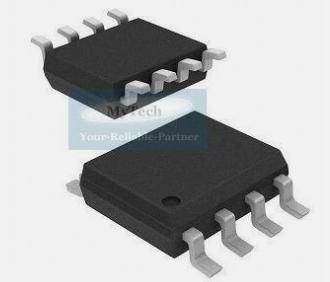
Btw, I own this excellent same model Aspire V3-571G laptop since new and its given me exceptional service over the years, as they surely don't build them like these laptops anymore.
If this answers your question and solved your query please "Click on Yes" or "Click on Like" if you find my answer useful👍

Re: Screen Flickering Issue - Games in Background and Desktop - Acer Predator Helios Neo 16 (PHN16-71, RTX 5070 Ti)
Just wanna confirm that i got the same issues with the exact same laptop model. So i guess we'll wait for an BIOS update.
 twinrix
Re: High DPC Latency on Predator PHN16-73-934N (Ultra 9 275HX + RTX 5070 Ti) Despite Latest Drivers
I get the exact same latency stutters (PHN16-73). I check the driver page weekly. No new driver updates or BIOS. Even though the BIOS download on the drive page says it was released last month, it was really released back in July sometime. It's just updated to last month with the exact same version number.





