





Best Of
Re: Two Brand New Acer SA272 G0bi 27” Monitors not powering on - tried two units, same issue
When multiple brand-new units of the same model, like the Acer SA272 G0 27" monitor, fail to power on, it points to a probable issue with the batch, a specific component, or the external power supply rather than individual faults.
Basic troubleshooting steps
Try these steps with both monitors and their respective accessories to isolate the problem.
Rule out power outlet issues
Test the power source: Plug another electronic device, like a lamp or phone charger, into the same wall outlet to confirm it is working correctly.
Bypass power strips: If you are using a surge protector or power strip, plug the monitor's power adapter directly into a wall outlet to eliminate the surge protector as a potential failure point.
Verify the power adapter
Inspect the components: Visually inspect the power cords and adapters for any signs of damage, such as frayed wires, cracks, or bent prongs.
Swap power adapters: Since you have two monitors, use the power adapter from one unit to test the other. This can help determine if both monitors or both adapters are faulty.
Perform a power reset (or hard reset)
A power reset can clear any residual electrical charge that may be preventing the monitor from turning on.
Disconnect the power cord from the monitor completely.
Press and hold the monitor's power button for 30 seconds.
Reconnect the power cord and attempt to turn the monitor on again.
What to do if troubleshooting fails
If you have tried the steps above with both monitors and they still won't power on, the issue is likely with the products themselves.
Contact Acer support
Inquire about known issues: Explain to Acer support that you have received two brand-new units with the exact same issue. This indicates a broader problem, which Acer may already be aware of.
Request warranty service or replacement: Provide Acer with all necessary information to arrange a repair or replacement for the monitors under their warranty.
Return the monitors
Consider a full return: Given that two brand-new units have failed out of the box, you may want to return both to the retailer.
-----------------------------------------
If this answers your question & solved your query please "Click on Like" and then Yes "Answered".
 Axxo
Axxo
Re: Two Brand New Acer SA272 G0bi 27” Monitors not powering on - tried two units, same issue
Seems like you lucked out and got two bad monitors.
 JackE
JackE
Re: Request for Original BIOS File for Acer Aspire V3-571G (Q5WH LA-7912P)
Всё в порядке. Попробуйте сначала Q5WV1X64.fd. Если не получится, просто переименуйте файл в Q5WH1X64.fd и попробуйте ещё раз.
That's OK. Try Q5WV1X64.fd first. If it doesn't work, simply rename file to Q5WH1X64.fd and try it again.
JackE
Re: Request for Original BIOS File for Acer Aspire V3-571G (Q5WH LA-7912P)
Извлеките файл Q5WH1xx.FD, запустив загруженный EXE-файл 1.xx на другом компьютере. Скопируйте файл FD на USB-накопитель с индикатором активности. Вставьте флешку в V3. Нажмите и удерживайте FN+ESC. Нажмите кнопку питания. Отпустите FN+ESC после того, как индикатор начнет светиться. В случае успеха светодиоды перестанут светиться примерно через 5 минут, и V3 автоматически выключится. Имейте в виду, что, по моему опыту, это срабатывает примерно в 25% случаев.
Extract the Q5WH1xx.FD file by running the downloaded 1.xx EXE file on another computer. Copy the FD file to a USB stick with an activity LED. Insert stick into V3. Press & hold FN+ESC. Press power button. Release FN+ESC after LED activity starts. If successful, LED activity will stop after about 5 minutes and V3 will turn off by itself. Be forewarned that this only works ~25% of the time in my experience.
JackE
Re: Request for Original BIOS File for Acer Aspire V3-571G (Q5WH LA-7912P)
The symptoms that you are experiencing is because your Aspire V3-571G bios chip programming is corrupted and needs to be either reprogrammed with a special bios reprogramming tool or replaced.
I suggest that you buy a new UEFI programmed with the version 2.21 bios chip and change the chip, this bios chips is available on eBay with the last UEFI bios version 2.21 included HERE and its only GBP 15.39 this is the simplest solution to solving this problem.
V3-571G last released UEFI BIOS version 2.21
V3-571G bios chip should look like this or similar to this.
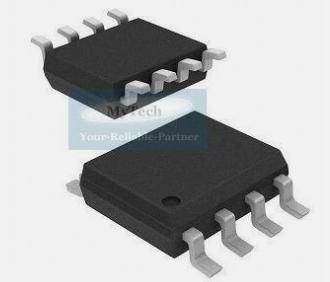
Btw, I own this excellent same model Aspire V3-571G laptop since new and its given me exceptional service over the years, as they surely don't build them like these laptops anymore.
If this answers your question and solved your query please "Click on Yes" or "Click on Like" if you find my answer useful👍





