





Best Of
Re: some game and my adobe after effect and premire pro crashing after ram upgrading from 16 to 32gb help model - Acer Aspire A715-42G
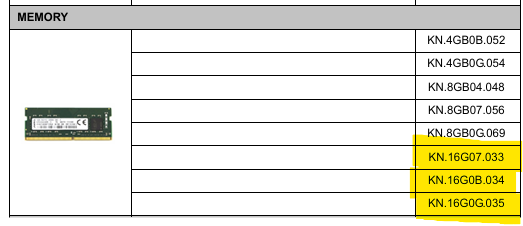
Your Aspire A715-42G laptop has certain Acer ram that it uses and its listed in its service guide which is the below type of ram, I've highlighted the 16GB modules below. All the AMD cpu models that your laptop uses is designed for max 64GB at DDR4-3200MT/s CL22 type ram by AMD, so 32GB should work perfectly, make sure that you first have the last A715-42G bios version 1.10 installed
Note: that its strange that the Samsung ram does not have a part number listed in CPUz > SPD, which could mean that its not a particular Samsung model ram and that is why it doesn't work fully with your laptop.
The ram in CPUz should show up like this for a DDR4-3200MT/s CL22
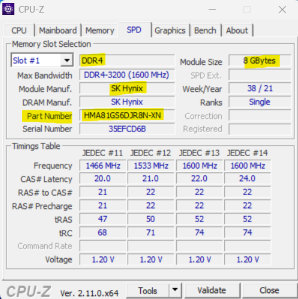
You need either the Acer ram listed below which is an Acer branded ram that is tested with this laptop or a 32GB kit from Crucial (which is a Micron ram) or a Hynix ram that are the ram that Acer use, as not every ram is compatible with Acer laptops even if its the same specs.
Below is the highlighted Acer compatible 16GB DDR4-3200MT/s CL22 type ram fitted and tested by Acer for the Aspire A715-42G laptop, which is the best ram to use, I don't know what brand it is as its only got the Acer branding.
If this answers your question and solved your query please "Click on Yes" or "Click on Like" if you find my answer useful👍

Re: some game and my adobe after effect and premire pro crashing after ram upgrading from 16 to 32gb help model - Acer Aspire A715-42G
Hi rupesh_chauhan001
– Not quite — what I’m saying is: please check that the two RAM modules are from the same batch, sold together as a matched set.– Even if the specs look identical, mixing modules from different batches can lead to instability or suboptimal performance.– Kits are tested to work reliably together, whereas standalone modules might behave differently when paired.
 Puraw
Puraw
Re: some game and my adobe after effect and premire pro crashing after ram upgrading from 16 to 32gb help model - Acer Aspire A715-42G
Hi rupesh_chauhan001
2 x16GB DDR4 (32GB) is the maximum RAM this model supports
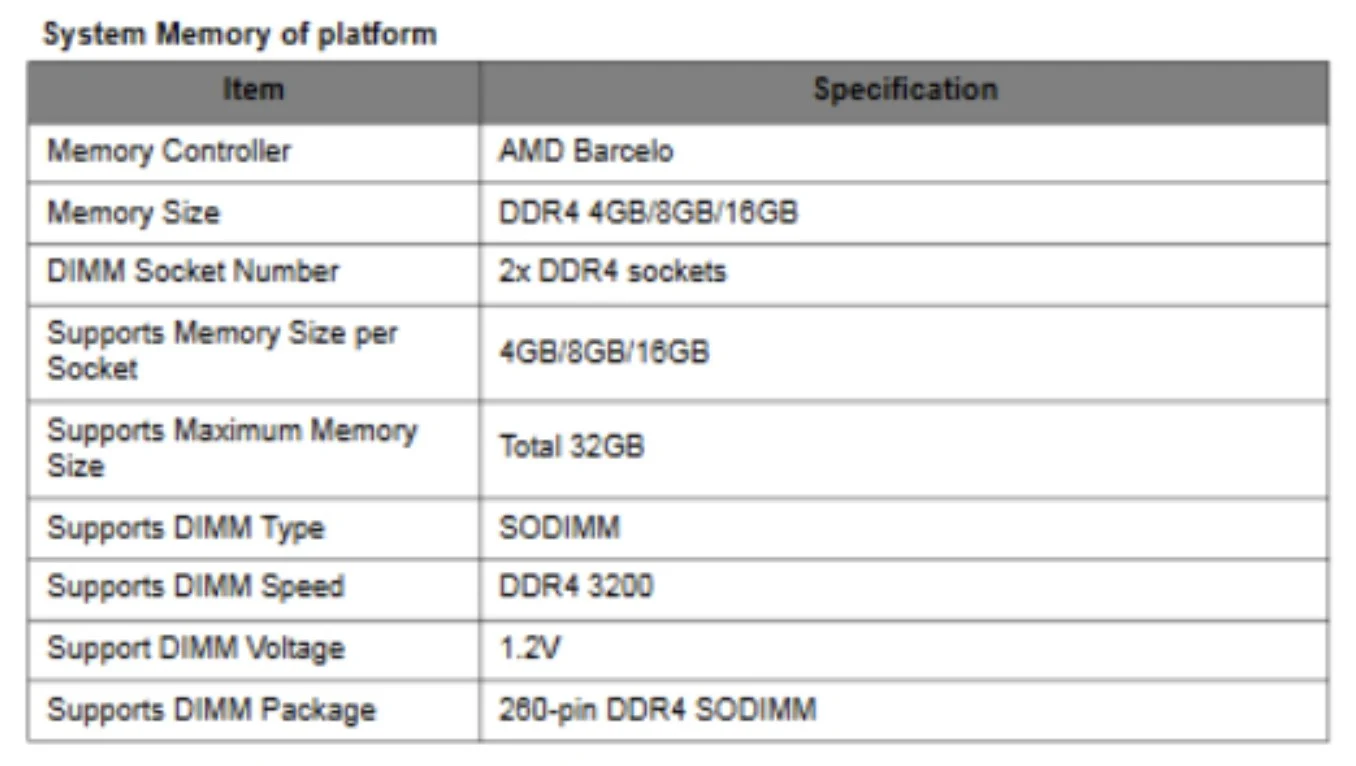
Acer Aspire A715-42G | SSD & RAM Upgrades | crucial.com
Note, make sure that the 2 modules are identical (same batch), a kit (see specs. below)
Technology DDR4
Module Type SODIMM
Density 32GB Kit (16GBx2)
Kit Quantity 2
Voltage 1.2V
Dimm Type Unbuffered
Die Density 8Gb or 16Gb
Default and performance recovery profiles
default (Jedec) 22-22-22
Speed & timing
Speed DDR4-3200
CASLatency 22
Extended Timings 22-22-22
Puraw
Re: Acer Predator PH16-72-Getting Blue Screen with Error Message: IRQL_NOT_LESS_OR_EQUAL (0xA) What failed: ntoskrnl.exe
Wah, itu memang bikin frustasi banget kalau udah reinstall Windows tapi masih kena BSOD. Bisa jadi memang ada masalah di hardware, terutama RAM atau SSD. Coba jalankan Windows Memory Diagnostic atau MemTest86 buat ngecek RAM-nya, dan pastikan juga semua driver dari situs resmi Acer sudah versi terbaru. Semoga cepat ketemu penyebabnya dan laptopmu bisa normal lagi!

Re: what model and where i can find replacement ? laptop model is acer predator helios 300. ph315-55
For your Acer Predator Helios 300 PH315-55 laptop, you need a replacement battery with the part number AP21A8T. Other compatible part numbers include AP21A5T and AP21A7T. This is an internal, 4-cell, Li-ion battery with a rating of 90.61Wh and 15.4V.
You can buy from Amazon or eBay
 Jack22
Re: AXC-780-UR16 slot M.2 compatibility
Hi VSProjects
Crucial officially lists M.2 SATA SSDs up to 2TB as compatible with the AXC-780-UR16:
- 2TB is the largest capacity Crucial validates for this model.
- Higher capacities aren't vendor-confirmed and may exceed controller or firmware limits.
If you're aiming for 2TB, that’s within safe, supported limits.
Puraw
Re: Acer ANV15-52-5271 NitroSense does not monitor
Follow these steps:
- Download the free version of Revo uninstaller and uninstalled nitro sense with it. It's important to let revo scan after uninstall because it'll find garbage files in registry that sense leaves behind and probably corrupts any new install. Let it clear those files.
- Go to Acer's website and download Nitrosense for your laptop. (If there's different version of nitrosense available then try them all one by one and check which one work for you)
- Extract folder and run Setup.exe
- Run Command prompt as Administrator
- type in the following and press enter (without the quotation marks): ".\lodctr.exe /R"
- Go back to the folder where you extracted Nitrosense
- Go into "Nitrosense V3.1" folder
- Run APPXBUNDLE file
- After that, Nitrosense immediately launched, and now it's back on my Taskbar, running every time I click on it.
If issue, persists:
Then download and install the Microsoft Visual C++ All-in-One pack. Since NitroSense requires specific versions that may not be available on your laptop, this will help. Use the link I provided to download and install the latest Visual C++ All-in-One pack. Make sure to install both the x86 (32-bit) and x64 (64-bit) versions one by one to ensure full compatibility. As applications require both versions, even on 64-bit systems, because some programs are built for 32-bit and others for 64-bit environments
Download all in one lack from below link and run:
2. Reset WMI service. Open CMD as administrator then run below command and restart your laptop.
winmgmt /resetrepository






