





Best Of
Re: SSD is running at PCIe 3.0 speeds. Tried 2 other PCIe SSDs, both also run at PCIe 3 in ACER TC-1775
Steven is correct, they didn't load the M2_2 slot on the TC-1775, so only one SSD slot. The M.2 slot for WLAN is WLAN only, SSDs will not fit!
 billsey
Re: Is there a stylus compatible with the Iconia Tab P10 P10-21Q-8484?
Hi IndexRailgun96
The Acer Iconia Tab P10 does not have an active digitizer layer (like Wacom AES or USI), so it won’t support pressure‑sensitive “active” pens. Instead, it works with universal capacitive stylus pens — the same type you’d use on most Android or iOS tablets without dedicated pen hardware.
Options you can consider:
- Acer‑branded capacitive stylus – sold in some regions as a generic accessory for the P10 series.
- BoxWave DualTip Capacitive Stylus – confirmed compatible with the Iconia Tab P10 (fiber tip and disc tip)https://www.amazon.com/BoxWave-Stylus-Compatible-Iconia-Tablet/dp/B0D4C3WZZR
- Universal capacitive stylus pens – available from retailers like Lazada Philippines, marketed for the Iconia Tab P10‑11‑K13Vhttps://www.lazada.com.ph/tag/acer-stylus-pen/
Key points:
- These pens simulate a fingertip, so they’re fine for navigation, note‑taking, or casual sketching.
- You won’t get pressure sensitivity or palm rejection like on tablets with USI or AES support.
- For smoother writing/drawing, look for styluses with a disc tip or fine fiber tip.
If you need precision drawing or professional note‑taking, you’d need a tablet with an active pen layer. But for everyday use, any good capacitive stylus will work reliably with the P10.
 Puraw
Puraw
Acer OMR310 wireless mouse goes to sleep. Is there an option to turn off sleep mode?
My OMR310 mouse goes into sleep after very short period of time if not used. It is terribly annoying. Every time you have to click a button to wake it up (it is not responsive for move). Is there an option to turn off sleep mode completely or at least extend the time before it sleeps?
Thanks
[Edited the thread to add model number to the title]

I have a Swift 3 SF314-51-530T. Can I upgrade to 8 GB or More RAM?
Hi,
I have a swift 3 SF314-51-530T (20116) laptop with 4 GB RAM. Can I upgrade tot 8 GB or More RAM?
[Edited the thread to add issue detail]
 VanJan
Re: Aspire lite 15 error msg "computer encountered an unexpected error...click OK to restart computer, and restart installation"
Hi Joylim
To enter Safe Mode when Windows won’t boot normally, you can trigger recovery mode by interrupting the startup process three times:
- Turn on the laptop and as soon as you see the Acer logo, press and hold the Power button for 5 seconds to force shutdown.
- Repeat this process three times.
On the third boot, Windows should enter the Recovery Environment. From there:
- Choose Advanced options
- Then Startup Settings
- Press F4 to boot into Safe Mode
If Safe Mode doesn’t help, you can also select Reset this PC from the same screen.
Microsoft’s official guide: https://support.microsoft.com/en-us/windows/windows-startup-settings-1af6ec8c-4d4a-4b23-adb7-e76eef0b847f
Puraw
Re: Need help on Crisis Recovery of Travelmate P643-M on BIOS v1.13, no display, no boot
Thank you very much for being so helpful. I fixed this issue by booting the ssd on another laptop and then booted into the windows installer using usb pendrive. Then I deleted the efi partition and rebuilt it. After that, I was able to boot through ssd into Windows. I still cannot get into BIOS though. I will try to fix that later but for now, It works!

Re: Need help on Crisis Recovery of Travelmate P643-M on BIOS v1.13, no display, no boot
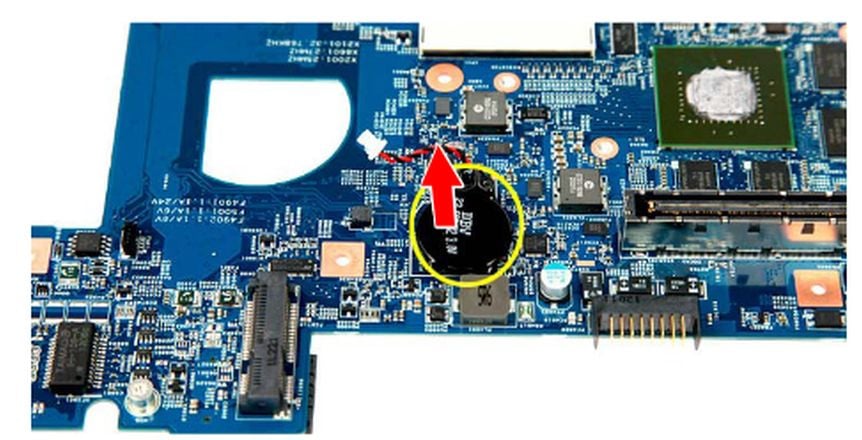
Phoenix is normal for this series. Disconnect coincell plug. Short its mainboard pins for ~10 seconds to default reset.
 JackE
JackE





