





Best Of
Re: Acer nitro 17-41 and 42 both completely bricked
I'm sure that if you took such new laptops like the Nitro AN17-41 that was your first AMD Ryzen laptop laptop or the AN17-42 your second AMD Ryzen laptop to a good tech they could fix both of these laptops completely, unless they have a faulty cpu as that can't be fixed/changed, but if the NVidia gpu is faulty or its got burnt vram, that can be disabled and you can still use the laptop perfectly with the cpu graphics.
I suggest that with your current Nitro AN17-41 model, that you first do a Hard Reset (like shown below) if that doesn't work, take your latop to a tech, as maybe both of these laptops have a shorted BQ chip or an EC chip or even the main power rail is shorted, so take your laptop to an experience tech so that he/they can diagnosed and pinpoint the exact fault of these laptops. Good luck and hope this helps you out further.
Do the Hard Reset first, that you can do early to both laptops like this:
Remove eleven (11) screws from the base cover to the upper case of your Nitro AN17-42, starting from the upper side, pry to release the upper side latches, continue releasing the remaining latches. Then remove the lower case.
Press the power key for 10 seconds to release all power to the laptop and then disconnect the main battery cable from the mainboard, then take the main battery out. Then disconnect the RTC/BIOS battery and then short the bios batteries + & - pins at the mainboard plug (as shown at A below) to reset CMOS and then take all the ran out.
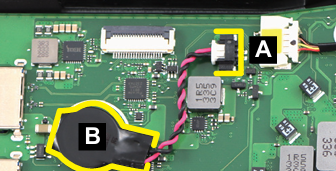
Leave the laptop like that for at least 30-60min so that the EC, Chipset and bios chips reset completely and then reconnect everything, if you have 2x ram modules, only connect 1x ram module and alternate the two ram modules and see if its not the ram that is faulty, as the laptop should turn on and boot properly with an image on the screen.
If this answers your question and solved your query please "Click on Yes" or "Click on Like" if you find my answer useful👍

Subject: Help! TPM 2.0 NOT ENABLED Issue on Acer Nitro 5 AN515-45 (TPM Version 3.87.0.5)
Problem Description: Hello everyone, I’m using an Acer Nitro 5 AN515-45 (BIOS Version V1.11) and encountering a TPM 2.0 issue:
- I have enabled TPM and Secure Boot in the BIOS/UEFI (confirmed via msinfo32: Secure Boot State: On).
- I checked with Get-TPM and tpm.msc, and TPM is enabled (TpmEnabled: True, Specification Version: 2.0, Manufacturer Version: 3.87.0.5, Status: Ready).
- However, a game I’m playing displays a "TPM 2.0 STATUS: NOT ENABLED" warning, which contradicts the system information.
What I’ve Tried:
- Enabled TPM and Secure Boot in the BIOS.
- Cleared TPM via tpm.msc and restarted the system.
- Updated Windows to the latest version.
- Verified status using msinfo32, Get-TPM, and tpm.msc.
Concerns: I suspect that TPM Version 3.87.0.5 (with the "0") might have compatibility issues with certain games or software. I’ve searched but couldn’t find a newer TPM firmware or BIOS version on the Acer Support website for the AN515-45.
Request for Help:
- Has anyone else experienced this issue with the Acer Nitro 5 AN515-45? Any solutions?
- Is there a newer BIOS or TPM firmware update available beyond version 3.87.0.5? (I checked but couldn’t find one.)
- Can anyone suggest how to contact Acer Support for a faster response?

Re: Will the Acer Nitro AN515-45 get a BIOS update to fix TPM Issues?
Thank you for your comment.
This game uses TPM Attestation (see provided links). The "Manufacturer Version" (which you can see in tpm.msc) is 3.87.0.5, in this version TPM attestation does not work properly.
So even while passing the TPM and secure boot requirements, it will not work because this firmware contains a bug.
Disabling TPM and secure boot unfortunately is no option because it won't allow you to play the game.
 Janrambo
Will the Acer Nitro AN515-45 get a BIOS update to fix TPM Issues?
Hi,
Does anyone know if the Nitro AN515-45 is going to receive anymore bios firmware updates?
The TPM version on the latest bios update is outdated, and still hasn't fixed TPM issues for which AMD supplied a fix in 2022.
As a result in this case Call of Duty Black Ops 7 will not run on this model until an update would be available because the TPM version is 3.*.0.*
amd.com/en/resources/support-articles/faqs/pa-420.html
support.activision.com/articles/trusted-platform-module-and-secure-boot
[Edited the thread to add model name to the title]
Janrambo





