





Best Of
Re: AN515-45 Thermal throttling in games only after reapplying heatsink, clean windows Install worth it?
Hi @PaulAnon ,
Since your throttling kicks in during gaming loads but not under synthetic tests, one thing worth trying is disabling Processor Performance Boost in Windows’ Advanced Power Settings.
On Ryzen laptops, Core Performance Boost (CPB) / Processor Performance Boost can push clocks and voltages up aggressively, spiking temps and triggering early thermal throttling. Turning it off caps the CPU to its base clocks, which can smooth out performance and avoid the gradual FPS drop you described — especially if the cooling system was recently disturbed.
How to disable in Windows:
- Press Windows + R, type
powercfg.cpl, and hit Enter. - Next to your active plan, click Change plan settings → Change advanced power settings.
- Expand Processor power management → Processor performance boost mode.
- Set both On battery and Plugged in to Disabled.
- Click Apply and OK, then restart.
You can always re‑enable it later to compare. If this reduces the drop‑off, it points to thermal/power boosting as the trigger rather than a lingering heatsink or paste issue.
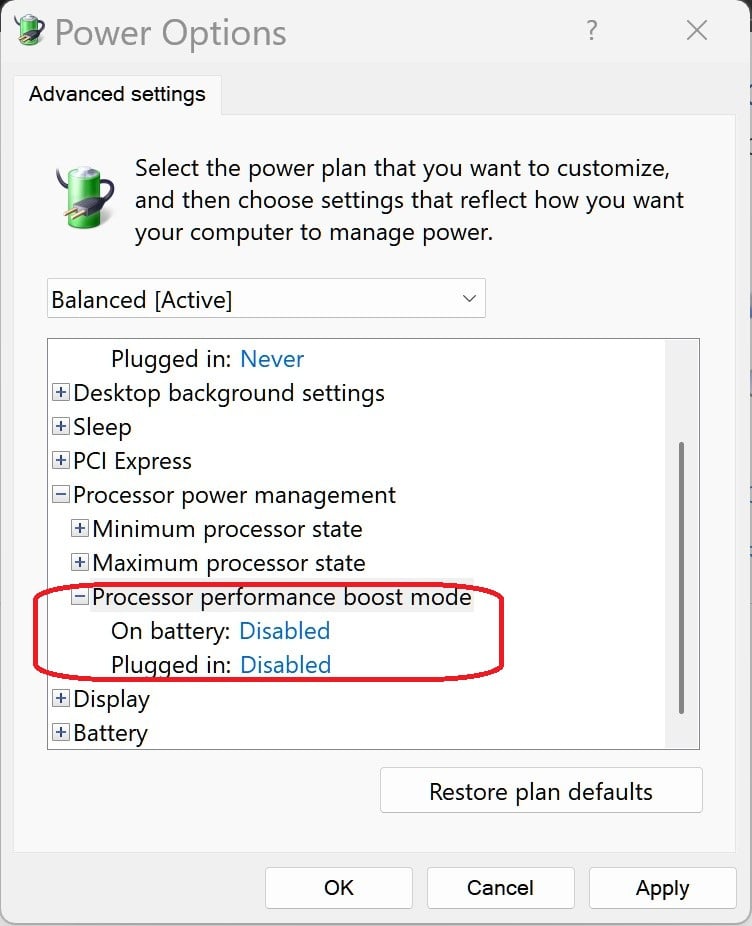
If this option is hidden you need to unhide the following registry key (Attributes) by changing the value to 2:

 Puraw
Puraw
Re: Acer Spin 3 Screen Going Black randomly while typing - Battery report run
Hi @lzunich64 ,
Glad to hear the BIOS 1.51 update and adjusted sleep settings already improved things. To get the rest of your system current without introducing instability:
1️⃣ Driver updates — safest approach Use Acer’s Drivers & Manuals page for your SP314‑55N. Update in this order:
- Intel Chipset Driver → ensures power management and sensors run on the intended timing.
- Intel UHD/Iris Xe Graphics Driver → can fix wake/resume quirks tied to display output.
- Intel Serial IO / Management Engine → also involved in lid‑sensor events and sleep states.Skip “driver scan” tools or generic Intel packages — they can overwrite Acer‑tuned versions.
2️⃣ Check Event Viewer for sleep triggers Press Windows + X → Event Viewer → Windows Logs → System.Filter for Power‑Troubleshooter events — these log the exact reason Windows thinks the system went to sleep.
3️⃣ About the Apple charging stand If it has magnets (common in MagSafe docks), it could briefly trip the Hall‑effect lid sensor if placed close to the palmrest/hinge area. Easy way to test: move it a metre away for a day or two and see if the random sleeps vanish.
4️⃣ Optional – Fast Startup If you haven’t yet, disabling Fast Startup (Control Panel → Power Options → “Choose what the power buttons do”) can smooth out wake behaviour.
Let me know once the core Acer drivers are refreshed and if the lid‑sensor test changes anything — from there we can decide whether to dig deeper into power plan policy or firmware EC resets.
Puraw
Re: Acer Predator Helios Neo 16 PHN16-73.whether both fans are 5th Gen Aeroblade or if only one is.
Hi johnpeter_1999
PHN16‑73 fan type before you buy On paper, the Predator Helios Neo 16 PHN16‑73 is listed with “5th Gen AeroBlade Fans” in the plural. Acer doesn’t break down whether both CPU and GPU fans are metal AeroBlades, or if — as with some prior Helios Neo configurations — only the CPU side gets a metal AeroBlade while the GPU side uses a standard plastic‑bladed blower.
Puraw
Re: Is the Acer AP21D8M battery compatible with the AN517-41 laptop?
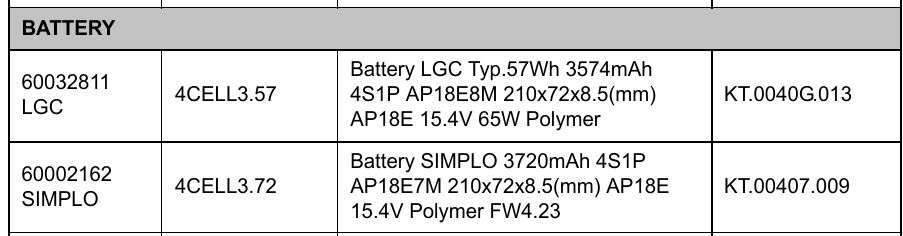
These are the Acer listed batteries compatible with the Nitro AN517-41 model, the AP21D8M is the same voltage and amperage battery so it will work, but the Li-ion AP21D8M battery should work with the Li-polymer adapter for the AP18E7M or 8M batteries listed by Acer, as Li-Po batteries can generally be charged by a Li-ion charger, but it is crucial to ensure that the charger's voltage and current output are compatible witch with these batteries they are, to avoid overcharging, which can damage the battery and even cause a fire.
To ensure 100% safety and effective charging I suggest that you use the proper listed battery for the Nitro AN517-41 laptop, as listed by Acer which is either the AP18E7M or 8M batteries, as the AP21D8M you can use, but it could be a fire hazard and can overheat the charger or the battery and there is a hazard of a fire. So I suggest that you return this battery and get them to send you the oem AN517-41 Acer listed battery like below, which is from the AN517-41 Acer service guide, so you can show them the table below. Good luck and hope this helps you out.
The listed batteries below for the Nitro AN517-41 model is part of this computer’s compatibility that is tested and verified by Acer’s internal testing department. All of its system functions are tested under Windows® 10 environment. Refer to the following lists for components, adapter cards, and peripherals which have passed these tests. Regarding configuration, combination and test procedures, please refer to the Nitro 5 AN517-41 Compatibility Test Report released by the Acer Mobile System Testing Department.
If this answers your question and solved your query please "Click on Yes" or "Click on Like" if you find my answer useful👍

Re: Trouble connecting External monitors via USB-C with Lenovo Dock on Acer nitro 5 AN515-55
Hi, the Nitro 5 AN515‑55 USB‑C port is data‑only. It doesn’t support DisplayPort Alt Mode or Thunderbolt, so you can’t send video through it to an external display. What you should get is an active USB3.0 graphics adapter like this one: https://www.amazon.com/Adapter-DisplayLink-Graphics-Outputs-Compatible/dp/B094G5JLNC?th=1
Note that you need to download the Diplaylink driver for this adapter
Puraw





