





Best Of
Re: Acer swift go 14 AI snapdragon series camera not working
To fix the camera on your Acer Swift Go 14 AI Snapdragon series laptop, you will need to check physical controls, adjust your Windows privacy settings, and troubleshoot the camera's driver. In some cases, a recent Windows update may have caused a conflict with the drivers on Snapdragon-based models.
Step 1: Check for a physical camera switch or shutter
Many modern laptops include a physical switch or sliding shutter to disable the camera for privacy.
Locate the switch: Check the sides of your laptop for a small switch with a camera icon.
Look for a shutter: Some models have a small slider built directly into the bezel above the camera lens.
Ensure it is enabled: Make sure the switch is in the "On" position or the slider is open and not covering the lens.
Step 2: Allow app access in Windows settings
Windows 11 has privacy settings that can block apps from using your camera.
Open the Start Menu and click Settings.
Go to Privacy & security, then click Camera under "App permissions".
Turn on Camera access and Let apps access your camera.
Ensure that Let desktop apps access your camera is also turned on, as this is required for apps like Zoom, Teams, and web browsers.
Step 3: Run the Windows camera troubleshooter
Windows can automatically find and fix many camera problems.
Open the Start Menu and navigate to Settings > System > Troubleshoot.
Click on Other troubleshooters.
Find Camera in the list and click Run. Follow the on-screen prompts.
Step 4: Reset the camera app
If the camera fails only in the built-in Camera app, resetting it can resolve the issue.
Go to Settings > Apps > Installed apps.
Find the Camera app, click the three-dot menu next to it, and select Advanced options.
Scroll down to the "Reset" section and click the Reset button.
Step 5: Reinstall the camera driver
For Snapdragon-based laptops, a quick driver reset is often the most effective fix for camera errors, especially after a Windows update.
Open the Start Menu, type Device Manager, and open the application.
Expand the Cameras section.
Right-click on your Snapdragon camera (it may also appear as "Qualcomm MIPI camera driver" or a similar name) and select Uninstall device.
If prompted, check the box to Delete the driver software for this device.
Restart your laptop. Windows should automatically detect the camera and reinstall the default driver.
Step 6: Update Windows
Make sure your operating system is fully up to date, as Microsoft often releases fixes for known hardware issues through Windows Update.
Open Settings > Windows Update and click Check for updates.
Also, check for optional updates by going to Advanced options > Optional updates and installing any available driver updates.
-----------------------------------------
If this answers your question and solved your query please "Click on Like" and then Yes "Answered".
 Axxo
Axxo
Re: Acer swift go 14 AI snapdragon series camera not working
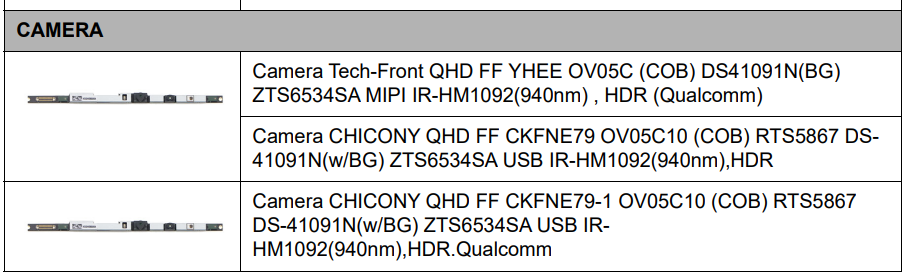
Send your new Swift Go 14 AI SFG14-01 laptop to Acer Tech Support in your country as its got camera issues and face recognition issues that are a hardware fault and the camera needs to be replaced. As a face recognition either works or it doesn't and the software can only do so much.
These are the cameras that your Swift 14 AI model SFG14-01 has and needs replacing as its faulty.
If this answers your question and solved your query please "Click on Yes" or "Click on Like" if you find my answer useful👍

Re: ACER Nitro ANV15-52 RTX5050 i5 13th Gen RAM Inquiry
Hi pavincicode,
Your current 40GB setup works because Intel’s Flex Mode allows partial dual channel when mixing module sizes. The first 8GB from each stick runs in dual channel, while the remaining 24GB from the 32GB module operates in single channel. This hybrid layout is common and safe, especially for multitasking and editing workloads.
That said, Acer officially rates the ANV15-52 for up to 32GB RAM, and Crucial’s compatibility guide mirrors that limit. While the CPU (i5-13420H) technically supports up to 64GB DDR4, the Acer motherboard or BIOS may impose a cap. So far, no confirmed reports on Acer Community show 64GB working on this model.
Until someone verifies 64GB on this exact model, it's best to treat 32GB as the safe ceiling. If you do test it, sharing your results would help others in the same situation.
Acer Nitro 5 AN515-52 | SSD & RAM Upgrades | crucial.com
 Puraw
Puraw
Re: ACER Nitro ANV15-52 RTX5050 i5 13th Gen RAM Inquiry
Acer does that with most of their laptops and quote 32GB max ram except for a few laptops that they do quote a max 64GB capacity. My Predator Neo PHN16-71-50JG model 13th Gen cpu i5-13500HX cpu/RTX4050 gpu is the same as your Nitro ANV15-52 where Acer quotes a max ram capacity of 32GB at DDR5-4800MT/s CL40 and my laptop I know can work on up to 128GB of max ram.
Be aware that your Nitro ANV15-51 with its either i9-13900H or i7 or i5-13th Gen type cpu's have an Intel memory design capacity of max 96GB and can use a max memory type speed 5200MT/s and Amazon does sell a 64GB kit at DDR5-5200MT/s which is a Crucial Micron manufactured type ram. So these memory kits as with video editing the more memory you have the better it is for the editing process. Good luck and hope this helps you out.
Note: I've update my Predator Neo PHN16-71 laptop like 8 months ago to a Crucial 64GB kit at 2x 32GB DDR5-4800MT/s CL40 type ram and its working just fine when Acer has this laptop also listed at max 32GB ram capacity and I know this laptop has been updated to 96GB and even 128GB which is this laptops 13th Gen cpu's max Intel deigned memory capacity.
If this answers your question and solved your query please "Click on Yes" or "Click on Like" if you find my answer useful👍
Re: Do I need to remove stock SSD Heatsink to Install Adata Legend 900 on Nitro an515-57?
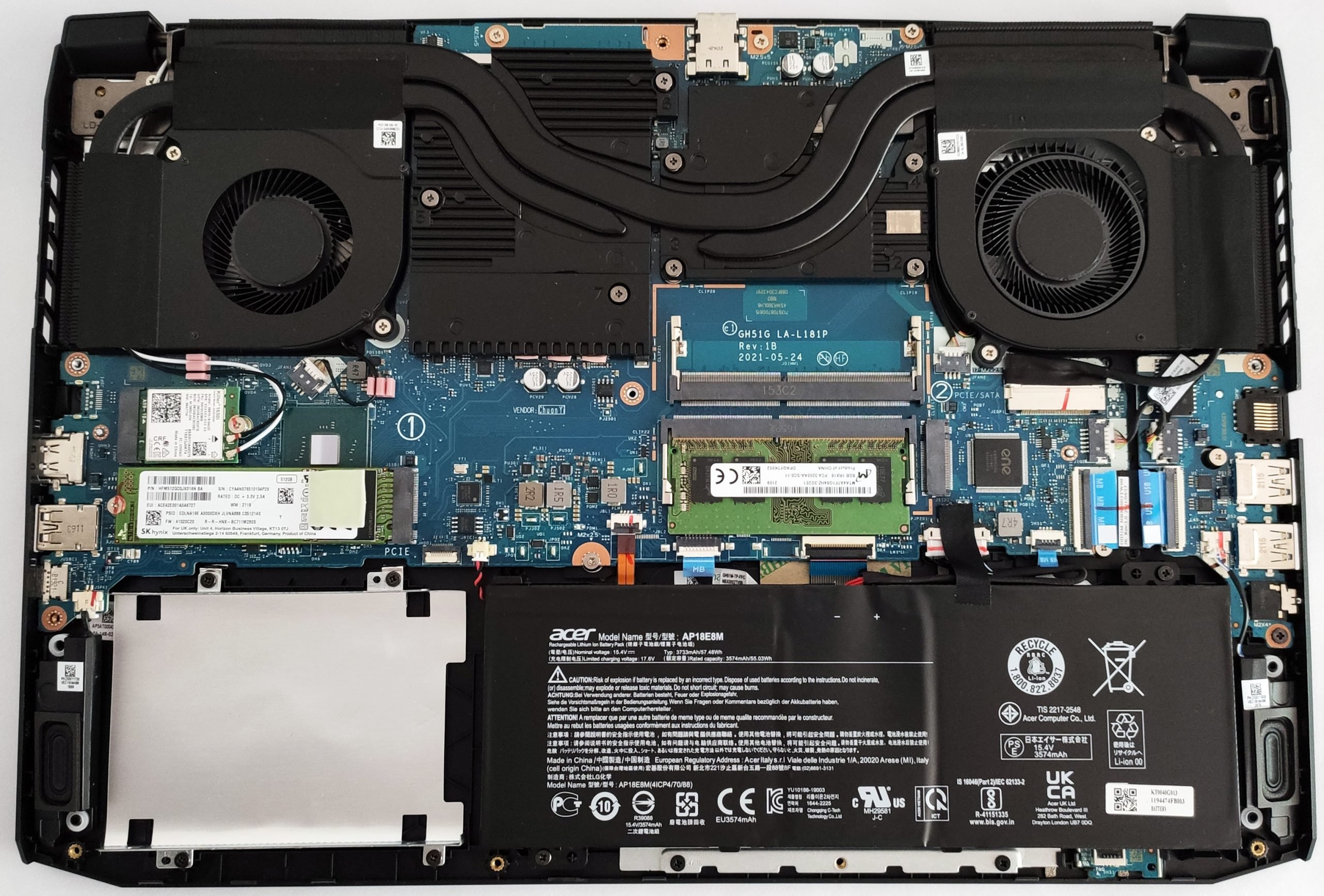
Hi, this picture does not show a heatsink in the AN515-57 but if your model has an SSD heatsink you should remove it as the SSD will be two thick with 2 heatsinks. I don't recommend to remove the heatsink that came with the Adata SSD.
 Puraw
Puraw
Re: Acer Nitro n50-640 desktop not powering ON. How to make it start up?
Hello!
After trying a power drain and reseating the RAM, the next step is to check the power supply and internal connections. The problem is likely either a faulty power supply unit (PSU) or an issue with the motherboard. First, check that the PC is plugged into a working outlet and that all cables inside the case are firmly connected, especially the ones from the PSU to the motherboard. You can also perform a paperclip test to see if the power supply is completely dead. If none of these steps work, it's very likely a component has failed, and you should contact Acer support, as your desktop should still be under warranty.

Re: Acer Nitro n50-640 desktop not powering ON. How to make it start up?
Hi Gentle_finn,
Sandra720Ben already covered the key basics—power drain, RAM reseat, and PSU check—but here are a few extra steps that may help revive your Nitro N50-640 desktop:
- Try a CMOS reset: Remove the coin-cell battery from the motherboard for 5–10 minutes, then reinstall. This clears any corrupted BIOS settings that might block startup.
- Check front panel connectors: Make sure the power switch cable from the case front panel is securely connected to the motherboard header. A loose or misaligned cable can prevent power-on even if the PSU is fine.
- Test with minimal hardware: Disconnect all drives, external peripherals, and expansion cards. Boot with just CPU, one RAM stick, and onboard graphics (if available). This rules out short circuits or faulty components.
- Try alternate RAM slots: Even if reseated, test each stick individually in different slots. A bad DIMM or slot can halt POST entirely.
- Tip: Wrap the paperclip in tape for insulation and avoid touching it while powered.
- Unplug the PSU from the wall.
- Remove the 24-pin connector from the motherboard.
- Bend a paperclip into a “U” shape.
- Insert one end into the green wire pin (PS_ON) and the other into any black wire pin (ground).
- Plug the PSU back in and flip the switch.
- If the PSU fan spins, it’s receiving power. If not, the unit may be dead.
- Check for motherboard LED or beep codes: If your system has diagnostic LEDs or a speaker header, note any patterns—they can point to RAM, GPU, or CPU faults.
If none of these steps work and the system shows no signs of life (no fans, no lights), it’s likely a motherboard or CPU failure. Since the N50-640 is relatively recent, Acer warranty support is your next best step.
Puraw
Re: Acer Nitro V 17 AI with Ryzen 9 365 REAL or NOT
This is a new model and these new NVidia and new Ryzen AI 9 365 cpu model that are not listed on the Acer site, this must be a specific Amazon model that Acer supplies to Amazon. The Nitro ANV17-61 was released at around 2025/05/16 and is listed on the Acer support site and has all the drivers and its had 3x bios version updates to latest version 1.07, so its a legit model, if that is what you are worried about.
If this answers your question and solved your query please "Click on Yes" or "Click on Like" if you find my answer useful👍
Re: Nitro ANV15-51 Cooling fan speed. Unable to adjust through Nitro sense
This is really concerning from Acer, that they have screwed over everyone who had installed the 1.26+ versions of BIOS, and as of now there is no fix. Lets just wait for the next update and maybe they will fix it, I don' t have much hope





