





Best Of
Re: Aspire lite 15 error msg "computer encountered an unexpected error...click OK to restart computer, and restart installation"
Hi Joylim
To enter Safe Mode when Windows won’t boot normally, you can trigger recovery mode by interrupting the startup process three times:
- Turn on the laptop and as soon as you see the Acer logo, press and hold the Power button for 5 seconds to force shutdown.
- Repeat this process three times.
On the third boot, Windows should enter the Recovery Environment. From there:
- Choose Advanced options
- Then Startup Settings
- Press F4 to boot into Safe Mode
If Safe Mode doesn’t help, you can also select Reset this PC from the same screen.
Microsoft’s official guide: https://support.microsoft.com/en-us/windows/windows-startup-settings-1af6ec8c-4d4a-4b23-adb7-e76eef0b847f
 Puraw
Puraw
Re: Need help on Crisis Recovery of Travelmate P643-M on BIOS v1.13, no display, no boot
Thank you very much for being so helpful. I fixed this issue by booting the ssd on another laptop and then booted into the windows installer using usb pendrive. Then I deleted the efi partition and rebuilt it. After that, I was able to boot through ssd into Windows. I still cannot get into BIOS though. I will try to fix that later but for now, It works!

Re: Need help on Crisis Recovery of Travelmate P643-M on BIOS v1.13, no display, no boot
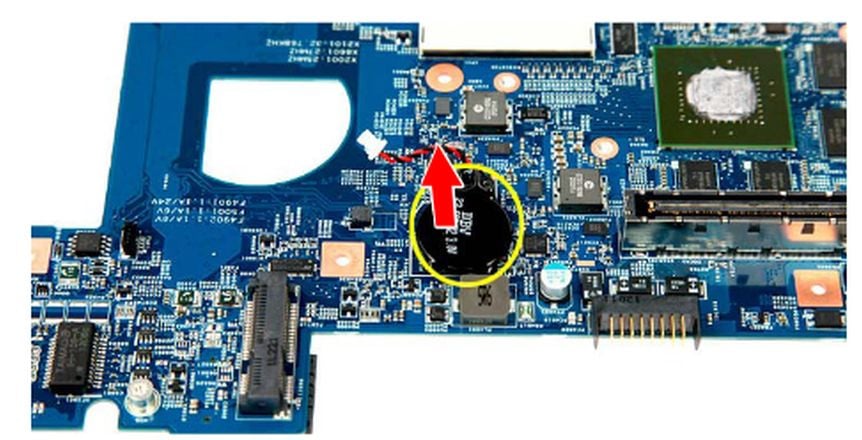
Phoenix is normal for this series. Disconnect coincell plug. Short its mainboard pins for ~10 seconds to default reset.
 JackE
JackE
Re: How to make your predator Helios 16 keyboard change colors based on On-screen scenes
The only software that does anything with the keyboard RGB in your PH16-xx model is the Acer Predator Sense > Scenario > Pulsar Lighting and all the settings there, there is nothing else that will work with these laptops.
If this answers your question and solved your query please "Click on Yes" or "Click on Like" if you find my answer useful👍





