





Best Of
Re: I've lost the m.2 heatsink that came with my laptop (PH317-53-70T), & I'm struggling to find a replacement.
Hi Bogus,
For your Predator PH317‑53‑70T, you don’t need the original Acer heatsink. Any thin M.2 2280 SSD heatsink designed for laptops will fit, provided it clears the chassis and doesn’t press against the bottom cover.
A solid choice is the Easycargo slim copper heatsink kit (includes 0.5 mm and 1 mm thermal pads): https://www.amazon.com/Easycargo-Laptop-Heatsink-Thermal-Cooling/dp/B081ZS1DZV?th=1
- Low‑profile, safe for laptop clearance.
- Pads included to match SSD thickness.
- Keeps NVMe drives cool under load.
Note that your BIOS is from 2020 for Windows 10. The new 2026 Secure Boot KEK update is being distributed primarily for Windows 11 25H2 systems. It may not apply to this older W10 BIOS, so don’t expect compatibility updates from Acer for this model.
Given the age of your unit, it’s more practical to invest in a modern Windows 11 25H2 laptop. Systems with Intel Ultra CPUs deliver much faster performance, improved thermals, and more efficient power management compared to legacy hardware.
 Puraw
Puraw
Re: I've lost the m.2 heatsink that came with my laptop (PH317-53-70T), & I'm struggling to find a replacement.
Hi Bogus,
Use the 0.5 mm thermal pad first — it’s usually the right thickness for laptop M.2 SSDs, since clearance under the bottom cover is tight. The 1 mm pad is included for cases where the SSD sits slightly lower and needs more contact, but in most Predator PH317‑53 units the 0.5 mm pad avoids pressure on the cover.
So:
- Start with 0.5 mm → safe fit, no bulging.
- Only switch to 1 mm if the heatsink isn’t making proper contact with the SSD surface.
That way you get cooling without risking clearance issues.
Puraw
Re: I've lost the m.2 heatsink that came with my laptop (PH317-53-70T), & I'm struggling to find a replacement.
Acer does not list an M.2 SSD drive heatsink for this 2019 released Predator PH317-53-71T model, you can buy the thin copper heatsinks on eBay or Amazon as they are the most suitable heatsinks for this laptop. Be aware that you need to buy a thin M.2 SSD heatsink so that you will be able to close the back cover of your laptop, so DO NOT buy a bulky heatsink.
To improve this laptops performance, I suggest that you upgrade the M.2 SSD to a quick M.2 SSD Gen 3 x4 lane drive that this laptops M.2 SSD slot max speed is designed for, see HERE, the benchmarks of the M.2 SSD done by Tom's Hardware site as a guide.
On my PH515-56 Nitro I've been using the very quick Samsung 970 Plus Gen 3 x4 M.2 drive (if its still being sold today?) if its not, then I suggest that you upgrade and use a Gen 4 x4 lane M.2 drives, as the Gen 4 M.2 SSD drives are backward compatible and will utilize the max speed of your PH317-53s Gen 3 x4 lane M.2 SSD slots speed.
Also, upgrade the ram to the most suitable and compatible type memory for your PH317-53-71T model cpu the Intel® Core™ i7-8750H Processor9M Cache, up to 4.10 GHz cpu, which can operate on a max 64GB capacity at DDR4-2666MT/s speed, but if you can't buy these ram modules anymore, then buy the commonly available the DDR4-3200MT/s CL22 type ram, as they are backward compatible and will be downclocked to 2666MT/s speed.
These DDR4-3200MT/s ram kit modules are available from Crucial ram here > Crucial 64GB Kit (32GBx2) DDR4-3200 SODIMM. Also make sure that you have the last bios version 1.12 for the PH317-53 installed also so that the ram is fully compatible. Do all the above as afterwards your PH317-53 laptops will have a new lease of life. Good luck.
Below are the Acer service guide memory modules that Acer lists for the PH317-53 model as a guide.
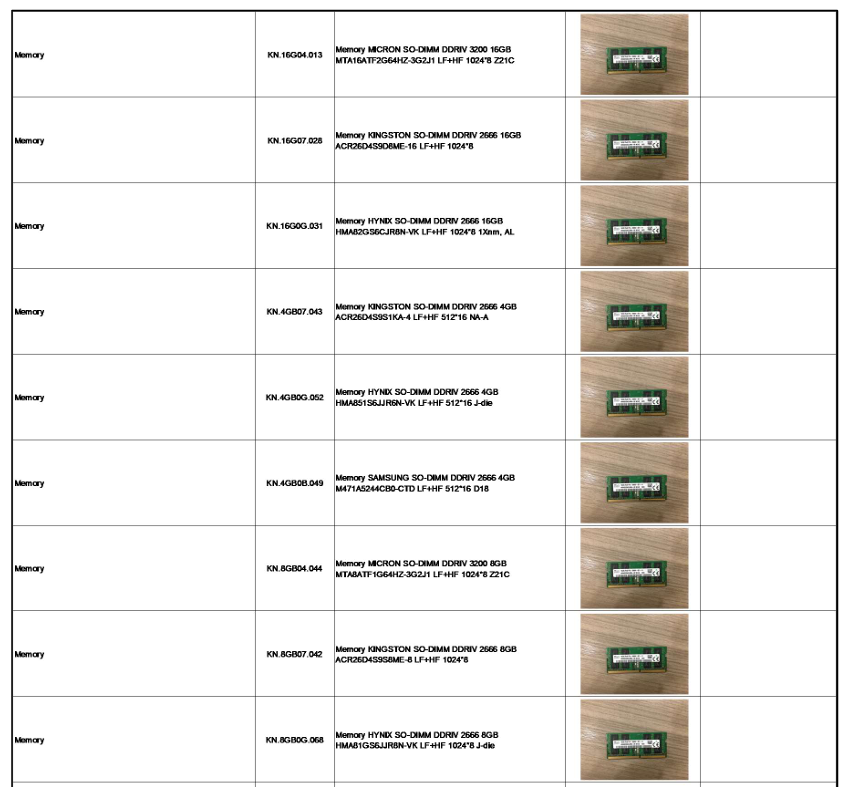
If this answers your question and solved your query please "Click on Yes" or "Click on Like" if you find my answer useful👍

Re: Hi is chromebook 315 CB315-5HT-C66N 15.6" N100-8 GB - 64 GB Flash Memory Touchscreen fanless or not?
Hello @memer,
The Acer Chromebook 315 (CB315-5HT-C66N) with the Intel N100 processor is fanless. It uses passive cooling, which allows it to operate silently without moving parts like fans.
Fan Status by Processor Type
Whether other Chromebooks are fanless depends heavily on the specific chip being used:
- Intel N100 / N-Series: These are almost always fanless. The Intel N100 has a very low power draw (6W TDP), which enables silent, passively cooled designs in many 11–14 inch and even some 15-inch models.
- MediaTek / ARM CPUs: These are nearly all fanless. MediaTek Kompanio chips (like the 520, 540, and 838) are designed for mobile efficiency, allowing Chromebooks to stay quiet and run cool even during multitasking.
- Intel Core i3: These usually have fans, though there are rare exceptions.
- Active Cooling: Most i3 models (like the i3-1215U or i3-N305 found in larger 14–15-inch laptops) require a fan to maintain performance and thermal stability.
- Passive Cooling: Older or specialized "Y-series" or "Core M" processors were sometimes fanless, but these are less common in modern standard i3 Chromebooks.
Quick Comparison Table
Processor Category | Cooling Type | Noise Level |
|---|---|---|
Intel N100 | Fanless (Passive) | Silent |
MediaTek Kompanio | Fanless (Passive) | Silent |
Intel Core i3 | Usually Fan (Active) | Minimal/Quiet |
If you feel my above comment answers your question, then click on 'Yes'! Click on "Like" if you find my answer is useful in any way.
 Murav
Murav
Re: Hi is chromebook 315 CB315-5HT-C66N 15.6" N100-8 GB - 64 GB Flash Memory Touchscreen fanless or not?
Yes, the Acer Chromebook 315 (CB315-5HT-C66N) featuring the Intel Processor N100 is a fanless device. It relies on passive cooling, which ensures silent operation, while its efficient N100 processor handles everyday tasks with 8GB of RAM and a 15.6-inch touchscreen.
----------------------------------------------------------------------------------
If this comment answers your question, Please "Click on Yes" and then Answered.
 Axxo
Axxo
Re: Hi is chromebook 315 CB315-5HT-C66N 15.6" N100-8 GB - 64 GB Flash Memory Touchscreen fanless or not?
Hello @memer,
The Acer Chromebook 315 CB315-5HT-C66N features a fanless design. This means it uses passive cooling rather than an internal fan, allowing for silent operation.
Key Specifications
- Processor: Intel Processor N100 (Quad-core, up to 3.4 GHz).
- Memory: 8 GB LPDDR5 RAM.
- Storage: 64 GB eMMC Flash Memory.
- Display: 15.6" Full HD (1920 x 1080) IPS Touchscreen.
- Cooling: Passive, fanless cooling system.
Benefits of Fanless Design
- Silent Operation: There are no moving parts for cooling, so the device stays quiet even under load.
- Durability: Fewer moving parts can lead to a longer lifespan as there is no fan to collect dust or eventually fail.
- Battery Efficiency: The Intel N100 processor is designed for low power consumption, contributing to a battery life of up to 12.5 hours.
While it is fanless, the device may get warm to the touch during more demanding tasks. It is recommended to use the Chromebook on hard, flat surfaces to allow for optimal heat dissipation.
If you feel my above comment answers your question, then click on 'Yes'! Click on "Like" if you find my answer is useful in any way.
Murav
Re: Blue light indicator on the X27UW1. I can’t seem to find the where the blue light indicator is on. Any ideas?
Hi Aushie,
The power indicator light on the Acer Predator X27UW1 is typically located on the bottom bezel, often integrated into or situated right next to the power button.
Light Indicator Meanings - On Predator monitors like yours, the color of this LED indicates the current power status:
- Steady Blue: The monitor is powered on and receiving an active video signal.
- Steady Amber/Yellow: The monitor is in standby or power-saving mode, meaning it is powered on but not receiving a video signal from your computer.
- Flashing Blue/Amber: This specifically occurs on Acer OLED models during an Image Retention Refresh (a maintenance process to prevent screen burn-in).
- No Light: The monitor is completely powered off.
Where to Find ItIf you cannot see the light at all:
- Check the Bottom Right or Center: Most Predator models place the power button and its LED in the bottom right corner. If your model is an ultrawide or curved version, it might be located at the bottom center for easier access.
- Backside Toggle: Some premium Predator models use a joystick/toggle button on the backside of the display bezel (right side when facing the screen). In these cases, the LED might be visible from the bottom edge underneath that area.
- Check for "Deep Sleep": If the light only appears briefly and then disappears, your monitor might be in a "Deep Sleep" state. You can usually disable this in the On-Screen Display (OSD) menu under "System" settings to keep the indicator more consistent.
If you see a flashing blue light but a black screen, it usually means the monitor is searching for a signal. Ensure your DisplayPort or HDMI cables are securely plugged in on both ends.
----------------------------------------------------------------------------------
If this comment answers your question, Please "Click on Yes" and then Answered.
Axxo
Re: Predator PH16-71 battery options. Been planning to get one for my Predator.
For your Acer Predator Helios 16 PH16-71, third-party batteries can be a cost-effective alternative, but they carry risks that may not be worth the trade-off for a high-end gaming machine.
Are Third-Party Batteries Worth It?
While third-party batteries are often significantly cheaper, their value depends on their build quality and safety features. Expert reviews and community consensus suggest that while many work adequately, they often lack the same longevity and safety standards as original parts.
- Safety Risks: Low-quality third-party batteries may omit overcharge and short-circuit protection circuits, leading to potential overheating or swelling.
- Performance Concerns: Non-genuine batteries sometimes provide incorrect charge readings or fail to be recognized by the system's power management software.
Battery Compatibility: PH16-71 vs. PHN16-71
Yes, the batteries for the Predator Helios 16 (PH16-71) and the Predator Helios Neo 16 (PHN16-71) are cross-compatible. Both models use the same standard battery specifications:
- Part Number: Commonly identified as AP21A8T or AP21A7T.
- Capacity: 90 Wh (4-cell).
- Voltage: 15.4V (some variants are 15.2V, which are generally interchangeable).
Battery Options for Predator PH16-71
When choosing a replacement, prioritize these categories:
- Genuine Acer Batteries: These are the safest option, ensuring full compatibility and standard safety protections.
Click on "Yes" if it answers your question and Click on "Like" if you find my answer useful
 Diya1811
Re: Predator PH16-71 battery options. Been planning to get one for my Predator.
Hello @mwvane,
Yes, the Predator PHN16-71 (Helios Neo 16) and the PH16-71 (Helios 16) use the same battery models. Both laptops typically come with an internal 90Wh / 15.4V lithium-polymer battery. The most common compatible part numbers for both models are AP21A8TAP21A7T, and AP21A5T.
. Are Third-Party Batteries Worth It?
Third-party batteries can be worth it as a budget-friendly alternative, but they carry risks that depend on the supplier's reliability.
- Pros:
- Cost: Significantly cheaper than official OEM replacements.
- Availability: Easier to find for older models where the manufacturer may have stopped production.
- Cons & Risks:
- Safety: Lower-quality batteries may lack essential protection circuits for overcharging or overheating, posing a fire risk.
- Inaccurate Reporting: Third-party firmware might show incorrect wear levels or jumpy percentage readings.
- Longevity: They often use lower-grade cells that degrade faster than the original 300–500 cycle lifespan of OEM packs.
Recommendations for Replacement
If you choose a third-party option, prioritize "Trusted Compatible" brands that offer a warranty over "Unverified" or misrepresented "fake genuine" listings.
- OEM Option: Check for genuine parts on eBay using part number KT.00407.011 or AP21A7T
Expert Advice: If your current battery is failing very early, some tech experts suggest checking for motherboard chip issues (like BQ or EC chips) before assuming the battery itself is dead.
If you feel my above comment answers your question, then click on 'Yes'! Click on "Like" if you find my answer is useful in any way.
Murav





