





Best Of
Re: Predator Helios Neo 16 (PHN16-72) - External monitor compatiblity and dGPU passthrough questions
Yes, you can get direct RTX 4060 output to your external monitor through a USB-C to DisplayPort cable, bypassing the integrated GPU completely. However, achieving a direct discrete GPU (dGPU) connection requires specific settings because the hardware routing behaves differently based on your active software configuration:
Hardware Connection Requirements
- Use the Back Ports: Connect your USB-C to DisplayPort cable to either of the two Type-C/Thunderbolt 4 ports located on the rear side of the laptop. Both rear Type-C ports support DisplayPort Alt Mode.
- Cable Standard: Ensure you use a high-quality, certified USB-C to DisplayPort cable (supporting DP 1.4 or higher) to avoid random disconnections at high refresh rates.
How to Force Direct dGPU Output (Bypass Optimus)The Acer Predator Helios Neo 16 (PHN16-72) features Advanced Optimus (MUX Switch). If left on "Auto" or "Optimus" mode, the system may dynamically route the video signal through the integrated Intel GPU to save power, limiting performance and disabling features like G-Sync. To force a hardware-level direct connection to the RTX 4060, you must choose one of these options:
- Via PredatorSense (Recommended): Open the pre-installed PredatorSense app. Go to the GPU settings and switch the GPU mode from Auto or Optimus directly to NVIDIA GPU Only (or dGPU). Restart your machine if prompted.
- Via NVIDIA Control Panel: Right-click your desktop and open the NVIDIA Control Panel. Under Manage 3D Settings, locate the Display Mode tab and explicitly select NVIDIA GPU Only.
- Via System BIOS: Restart the laptop and tap F2 repeatedly to enter the BIOS menu. Locate the display/graphics settings and switch the configuration from Dynamic to Discrete GPU Only. Save changes and exit.
Once set to dGPU-only mode, the rear Type-C controller hooks directly to your RTX 4060, allowing full performance, lower display latency, and compatibility with NVIDIA G-Sync.
If this comment answers your question, Please "Click on Yes" and then Answered.
 Axxo
Axxo
Re: Acer Swift Go 14 AI [ Snapdragon X Plus ] webcam not working
Attention all hair-pullers: the struggle is over, I cracked the code! This is THE guide you’ve been dreaming of. Follow these steps and your camera will rise from the ashes like a tech phoenix, complete with facial recognition magic.”
Now, confession time: I went from loving this machine to plotting its demise after hitting the dreaded “Reset PC” button. Everything worked… except the camera and IR facial recognition. Cue the chaos: uninstalling drivers, reinstalling bloatware, resetting the PC another 6–7 times. I sacrificed an entire weekend, 24 hours of family time, just to stare at error messages. At one point, I was THIS close to marching into an Apple store and saying, “Give me a MacBook, I’m done!”
But guess what? The camera is back, my sanity is restored, and my love for this sleek, silent beast has returned. And the fix? It’s so simple you’ll laugh. Ready? Let’s do this.
First step
Download "DriverStore Explorer" from this link, extract it
(sorry acer didn't let me post link address, you will have to type it)


Second Step
Run Rarp.exe
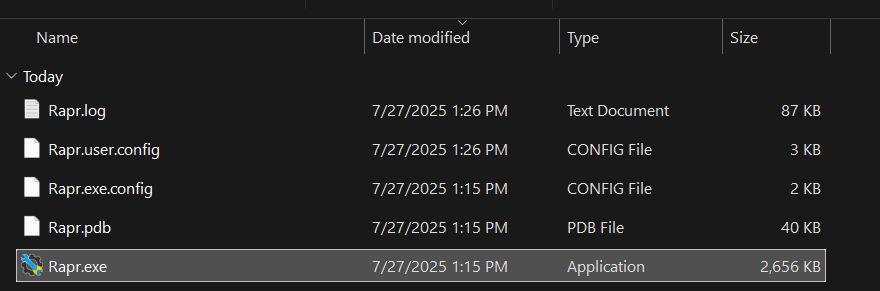
Then you'll see a window like this
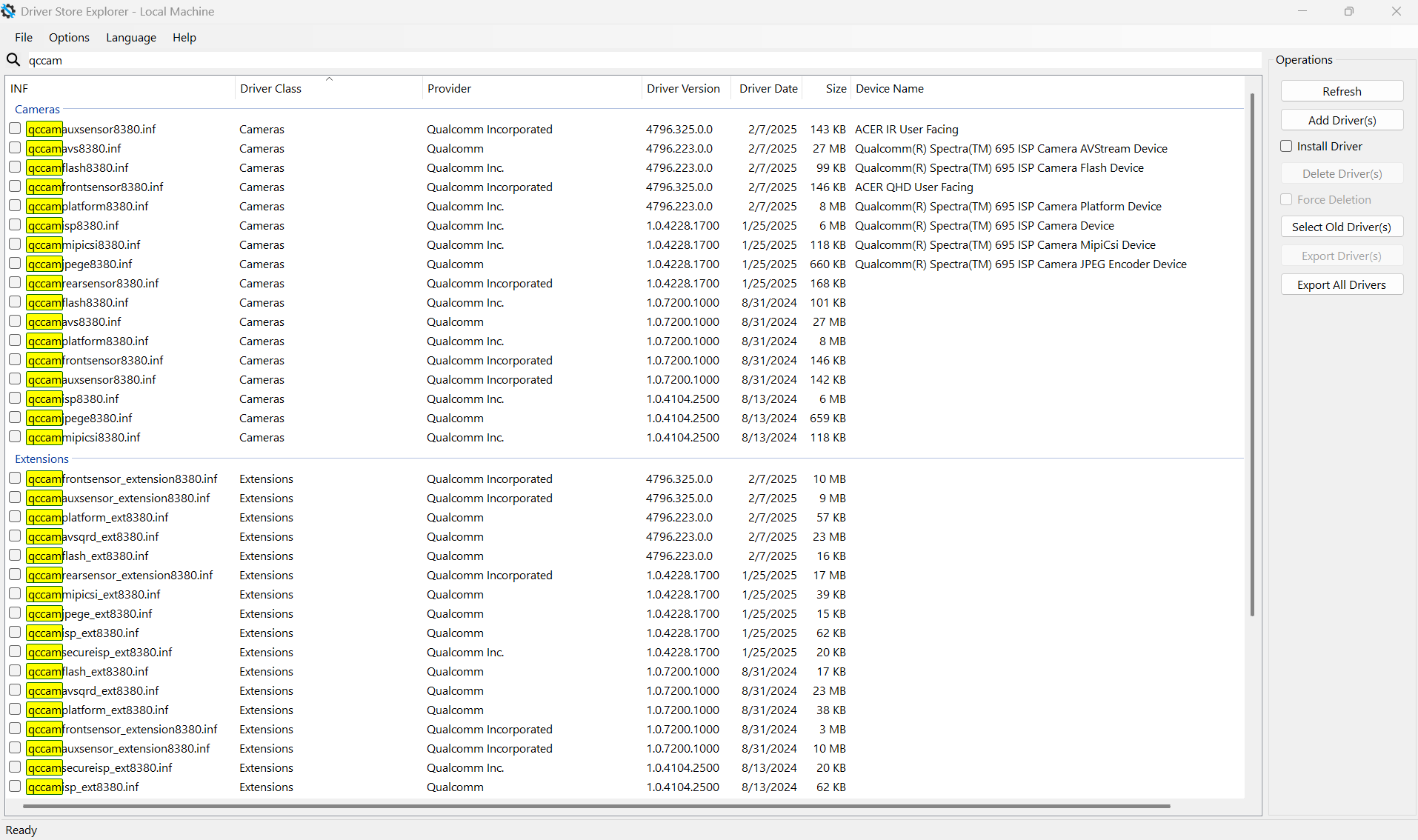
Search for "qccam" and select every one of the software
Third Step(Very Important)
After selecting all the INF files, click on "Export Driver" and save it in a folder.
Fourth Step
After exporting the drivers, check "Force Deletion" and "Delete Driver(s)", and then restart the PC.
Fifth Step
Open "Device Manager" and click on "Add Drivers"
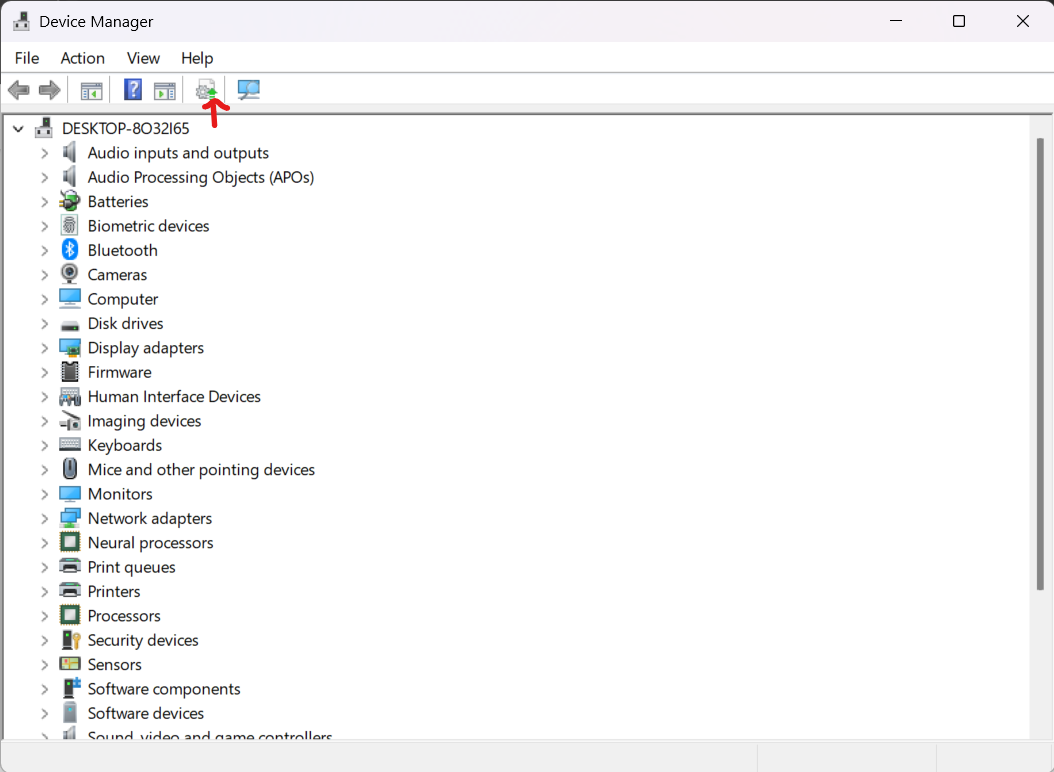
And then select the folder where you have exported the old drivers and click on Next
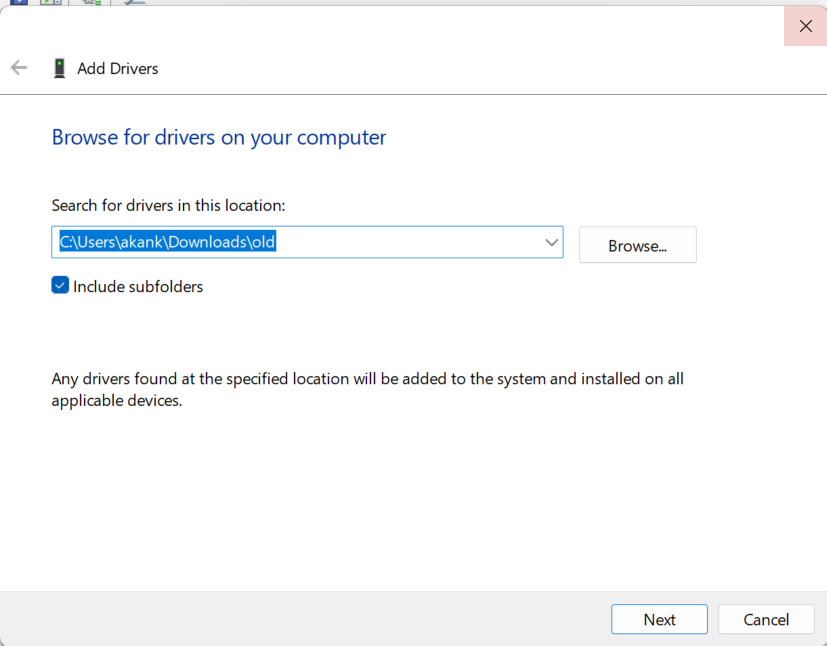
After this restart and try to set up face unlock.
 BG_KING
Re: Having issues with Predator sense App Predator Helios Neo16 AI (PHN16-73)
Thanks for reporting back. Let's hope it stays solved. 🙂
 JackE
JackE
Re: bought a new Acer Nitro 18 AI and the screen looks like a old vcr tape when i start a game
the selection to only use the nvdia gpu has worked for me
now it operates normaly

Re: Acer Nitro V15 ANV15-51 automatically disables the battery charge limit and the battery level drops even when the laptop is shut down.
Hi
The battery charge‑limit option on the Nitro V15 ANV15‑51 was never a fully reliable feature. It often disables itself because it interferes with Windows 11’s ACPI drivers and Modern Standby protocol. Limiting charge to 80% is more of an internet myth than a proven method to extend battery life, and in practice it can cause instability.
Here are the steps that work consistently:
- Drivers & firmware: The latest Intel chipset driver is 10.1.36.7 (Jan 2026). It should install automatically via Windows Update if “Receive other updates” is enabled. Avoid AcerSense for BIOS/driver updates—use Windows Update only.
- Power plan: Switch to the Balanced plan instead of Acer’s custom plan.
- Power mode: In Settings > System > Power & battery > Power mode, select Best Power Efficiency.
- BIOS & OS: Update to the newest BIOS release and Windows 11 25H2, build 26200.8457.
- Shutdown drain: If the battery drops more than ~1% per day while shut down, check Device Manager > Network adapters > Properties > Power Management. Enable “Allow the computer to turn off this device to save power” for both Wi‑Fi and Bluetooth adapters.
This way you rely on Windows’ built‑in power management, which is more stable than Acer’s charge‑limit toggle.
 Puraw
Puraw
Re: Having issues with Predator sense App Predator Helios Neo16 AI (PHN16-73)
Hello again ,
so the problem remained unsolved but today i got some windows updates and an update for Nvidia driver and that suddenly solved everything!!
Thank you so very much I appreciate all your help @JackE @GAMING6698 @darksektorzone @StevenGen

Re: Having issues with Predator sense App Predator Helios Neo16 AI (PHN16-73)
Some Predator Sense versions still have bugs like you describe. Try uninstalling it and re-installing the version you can download at this LINK.
JackE
Re: Having issues with Predator sense App Predator Helios Neo16 AI (PHN16-73)
Did you restart Windows yet?
JackE
Re: Having issues with Predator sense App Predator Helios Neo16 AI (PHN16-73)
How did you uninstall 468?
JackE
Re: Having issues with Predator sense App Predator Helios Neo16 AI (PHN16-73)
Trying to set custom logo?






