





Best Of
Re: Sf16-51T - Acer Sense not allowing changing of System Usage Mode
I uninstalled Acer Sense and Acer Config- and then reinstalled the version on the Acer web site. This appears to have resolved the issue. It appears windows update applies a later version (I guess from the Windows Store??) that is incompatible with Acer computers!
 LJG
LJG
Re: Predator PO3-P655-Does my PC motherboard support second slot gen 4 ssd nvme PCIe m.2?
Hello @iiEmry,
Yes, your Acer Predator Orion 3000 PO3-655 supports a second M.2 NVMe SSD, but there is a specific detail regarding the speed you should know:
- Slot 1 (Boot Drive): This is a PCIe Gen 4 x4 slot.
- Slot 2 (Secondary/Slave): This slot is typically rated for PCIe Gen 3 x4 speeds on this specific motherboard model.
What does this mean for your upgrade:
- Compatibility: You can install a Gen 4 SSD (like a Samsung 990 Pro or Crucial P3 Plus) into the second slot. It will work perfectly because PCIe Gen 4 drives are "backwards compatible" with Gen 3 slots.
- Speed Limit: If you put a Gen 4 SSD into the second slot, it will run at Gen 3 speeds (roughly half its maximum potential, or ~3,500 MB/s). You won't damage anything, but you won't get the full 7,000+ MB/s advertised for high-end Gen 4 drives.
- Recommendation: To save money, you might consider a high-quality Gen 3 drive or a budget Gen 4 drive (like the Crucial P3 Plus), as they often cost less and will perform at the slot's maximum limit anyway.
Installation Tips for PO3-655:
- Access: You will likely need to remove your RTX 4070 Super graphics card to reach the M.2 slots, as they are often positioned underneath or behind the GPU on this compact board.
- Screws: These pre-built PCs sometimes don't include the tiny M.2 mounting screw in the empty slot. You may need to purchase an M2x3mm screw if one isn't already pre-installed on the motherboard standoff.
Expansion: Your system also has two SATA III bays for 2.5-inch or 3.5-inch drives if you ever need even more mass storage.
If you feel my above comment answers your question, then click on 'Yes'! Click on "Like" if you find my answer is useful in anyway.
 Murav
Murav
Re: BIOS update for Intel 13-14 generation CPUs on Predator PO5-650
Hi Aradoks,
The latest BIOS version is R01‑B3 (July 2025). You’ll need to wait for Windows to install the new 2026 Secure Boot KEK certificate, which Microsoft is currently distributing.
This rollout is handled automatically once system requirements are met, so there’s no manual way to force the update. Just keep your system updated and Windows will apply the KEK when ready.
Привет, Aradoks
Последняя версия BIOS — R01‑B3 (июль 2025). Ожидайте установки нового KEK‑сертификата Secure Boot 2026, который Microsoft сейчас распространяет через обновления Windows.
Процесс выполняется автоматически, вручную ускорить его нельзя.
 Puraw
Puraw
Re: Is it possible to use display output and charging simultaneously through the USB-C port on the Helios Neo 16S?
Hi Pepperholic,
Yes, it is possible to use display output and charging simultaneously through the USB-C ports on the Acer Predator Helios Neo 16s, but there are critical power limitations to keep in mind.
USB-C Port Functionality
The Acer Predator Helios Neo 16s (PHN16s-71) features two USB-C ports that support Thunderbolt 4. These ports are multi-functional and can handle several tasks over a single cable if you use a compatible USB-C hub or a monitor with built-in Power Delivery (PD).
Display Output: Both ports support DisplayPort over USB-C.
Power Delivery (PD): Both ports support charging the laptop via USB-C PD.
Simultaneous Use: You can connect a single cable to a monitor that supports USB-C PD to both send a video signal and receive charge.
Critical Considerations
While simultaneous use is possible, the Helios Neo 16s is a high-performance gaming laptop with specific power requirements:
Charging Wattage: The laptop typically comes with a 230W power adapter for full performance. USB-C charging is generally limited to 100W.
Performance Impact: A 100W USB-C charger is sufficient for "light tasks" like web browsing or office work, but it may not provide enough power for intensive gaming. Under heavy load, the battery might still drain even while plugged into a USB-C charger.
Hardware Requirements: To charge and output video via one cable, your monitor must support USB-C Power Delivery. If the monitor does not provide enough wattage (e.g., only 65W), the laptop may show a "low power" warning.
Cable Quality: Not all USB-C cables support both high-speed data/video and high-wattage power. It is recommended to use a certified Thunderbolt 4 or high-quality USB4 cable.
Recommended Setup
For the best experience, especially if you plan to game on an external monitor, it is often better to keep the original 230W barrel-style power brick connected to the laptop while using the USB-C port solely for display output. This ensures the laptop always has maximum power for its GPU and CPU.
----------------------------------------------------------------------------------
If this comment answers your question, Please "Click on Yes" and then Answered.
 Axxo
Axxo
Re: Is it possible to use display output and charging simultaneously through the USB-C port on the Helios Neo 16S?
The Acer Predator Helios Neo 16S does support charging via USB-C Power Delivery (PD), but your current setup likely fails because the 65W provided by your monitors is the absolute minimum requirement for this laptop. While your previous ASUS laptop could function with 65W, many high-performance Acer Predator models struggle or refuse to initiate charging at this threshold, especially while the system is powered on and running.
Why Charging is Failing
- Wattage Requirements: The Helios Neo 16S typically requires at least 65W to 100W to charge via USB-C. Because 65W is the "floor," any slight power drop or background power draw from the laptop's high-performance components (like the CPU/GPU) can prevent the charging circuit from engaging.
- Port Specifics: On the Helios Neo 16S, only certain ports support the full 100W PD spec.
- The Thunderbolt 4 port (marked with a lightning bolt) is the primary port for PD charging and can typically accept up to 100W.
- The standard USB-C 3.2 Gen 2 port may be limited to 65W, making it less reliable for charging while the laptop is active.
- Power Negotiation: If you have two monitors connected, the laptop might be confused about which one should provide power, or it may prioritize the video signal over the low-wattage power input.
Recommended Solutions
- Test While Powered Off: Connect only one monitor and turn the laptop completely off. If the charging light (orange) appears, the laptop supports the feature, but the 65W is insufficient to power the device while it is running.
- Use the Thunderbolt 4 Port: Ensure your primary monitor is connected to the Thunderbolt 4 port on the rear or side, as this port has the most robust power management.
- Hardware Reset: If the port isn't detecting power at all, perform a battery reset:
- Unplug all cables and hold the Power Button for 30–60 seconds.
- Alternatively, look for a small pinhole reset button on the bottom of the chassis and press it with a paperclip for 15 seconds.
- BIOS Update: Check the official Acer Support site for BIOS and firmware updates. Some versions explicitly fix "USB-C charging quirks".
- Use the AC Adapter for Full Performance: For gaming or heavy work, Acer recommends using the original 230W. USB-C charging on this model is intended for light office tasks or "top-ups" during travel.
Click on "Yes" if it answers your question and Click on "Like" if you find my answer useful
 Diya1811
Performance mode switching and Bluelight Shield option disappeared on AcerSense after update on Acer Swift Go 14 SFG14-71
Hello,I am facing a software issue on my Acer Swift Go 14 OLED (SFG14-71) after the latest AcerSense update.
After the update, the following problems appeared:
- Quiet / Normal / Performance modes are no longer switching or are missing.
- Acer Bluelight Shield / Low Blue Light option has disappeared.
- AcerSense opens but looks empty and does not show proper system information.
Before the update, these features were working properly.
I have already tried reinstalling AcerSense and checking the official support page for my exact model, but the issue still remains. I also noticed that other users with the same model are reporting similar problems after the recent update.
Please let me know:
- Is this a known issue with the latest AcerSense update?
- Is there any official fix or workaround?
- Can I safely roll back to an older AcerSense version such as 5.0.2011, if that version was more stable?
- Are there any specific drivers, QuickPanel components, or BIOS updates required for this issue?
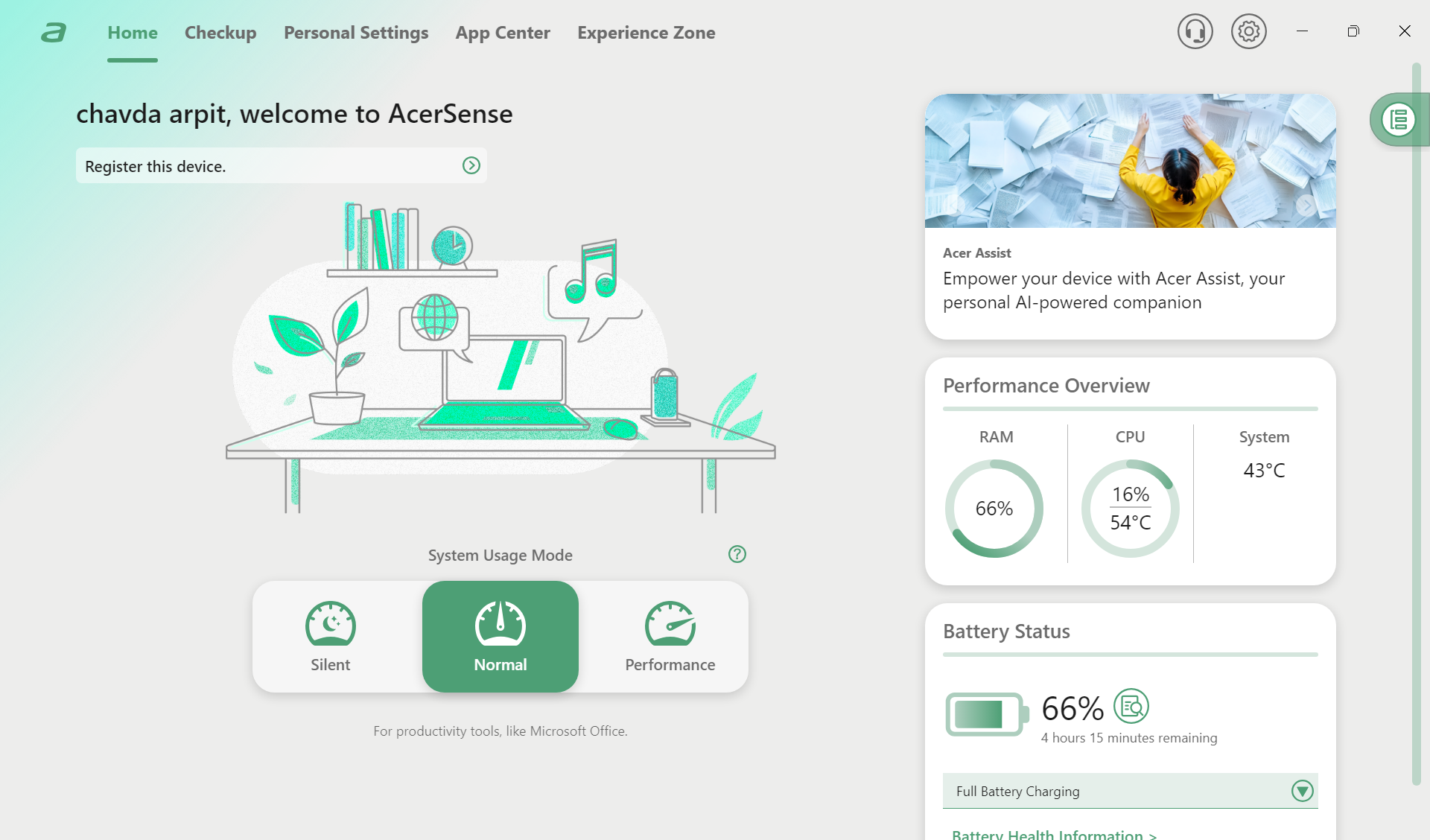
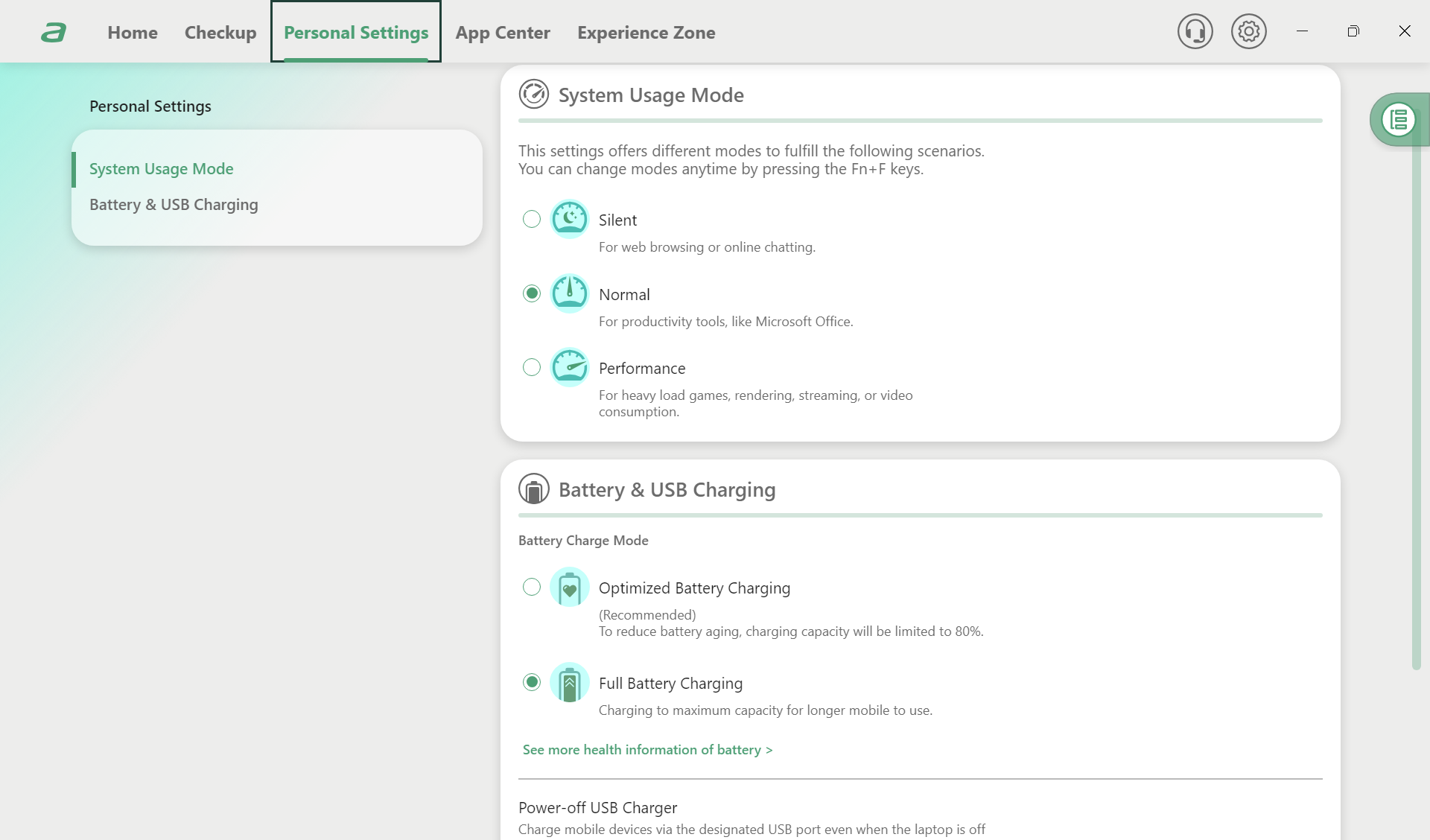
Please help me restore the missing performance modes and Bluelight Shield options.
Thank you.

Re: Aspire 3 A315-44P-R9WX, the laptop works when in charger only but when i got the replacement battery it only worked once
The battery in your 2023 model Aspire 3 A315-44P should not be faulty or needing replacement, you have wasted your money on a new battery, as these batteries last at least 4 years and longer before they start giving any problems and you will need to replace it with the Acer listed oem battery for the A315-44P model laptop like below.
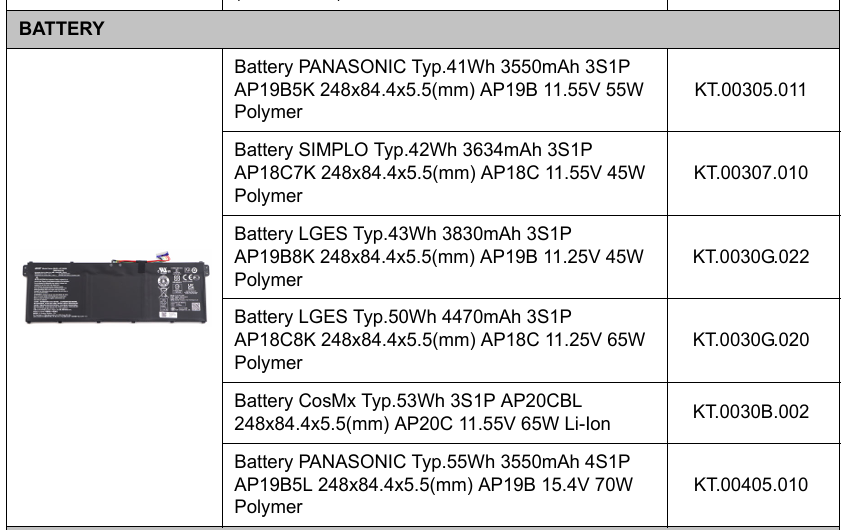
Anyway, the problem with your laptop is in its charging phase and its the IO chip that is not functioning properly and needs replacing as its burnt out. This job can only be done by an experienced tech that has all the micro soldering tools and a microscope that can fully analyse and pinpoint the exact problems and replace the appropriate chips.
Be aware that NO reset or anything that you can do will fix the laptops working off the battery only. Have a look at this link HERE of what is involved with a laptop that doesn't charge and/or comes On and how an experienced tech can fix it and how involved the repair is. Good luck.
If this answers your question and solved your query please "Click on Yes" or "Click on Like" if you find my answer useful👍





