





Best Of
Re: My AN517-55 doesn't have a applications for Nitrosence, Is the latest version available?
Hi DuhItsjunior,
Here it is. Download and install it:
----------------------------------------------------------------------------------
If this comment answers your question, Please "Click on Yes" and then Answered.
 Axxo
Axxo
Re: AN517-54-582A - nitro sense topped working correctly. I uninstalled it, but I can't find a link to a new driver. is there any alternate app?
Hi Olsy
There are no NitroSense (NS) versions listed on Acer Support for your laptop, either for Windows 10 or Windows 11. Some builds are being shared in community threads and may install, but they are not official and can cause issues over time. The safest path is to wait until Acer releases a new NS version specifically for your model.
 Puraw
Puraw
Re: Is there an ACER created system validation program for Predator PHN16-72?
Hi kbruff2026
Other than PredatorSense version 5.0.1463, Acer Support does not provide apps to check your system health.
To validate your system, follow these checks:
01
Check Device Manager
Device Manager shows hardware issues via warning icons.
Right‑click Start → Device Manager
- Expand each device group
- Look for yellow exclamation marks
- In the View menu → Show hidden devices, check for warnings
- Uninstall all drivers with yellow marks, Other Devices and Unknown Devices, reboot.
02
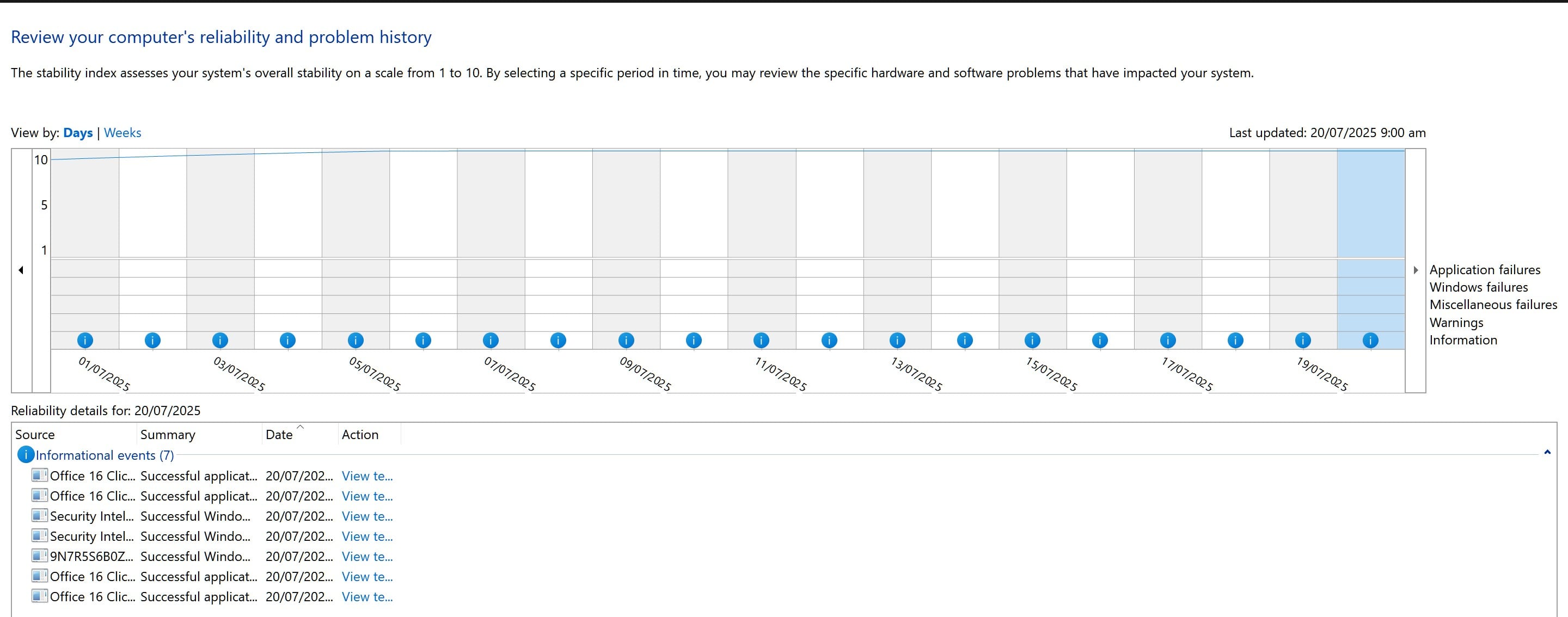
Check Reliability History
Reliability History shows system stability and error history.
Press Win + R → type perfmon /rel
- Look at the top stability chart (see screenshot)
- Ensure the line at the top is flat (horizontal)
- There should be no red error bullets only blue information icons
03
Check Event Viewer
Event Viewer logs system events and highlights critical issues.
Press Win + R → type eventvwr.msc
- Expand Windows Logs → System
- Confirm there are no Critical or Error logs
- Only Warnings and Information logs with Audit Success should appear
 Puraw
Puraw
Re: Recycled material suggestion, need to move toward manufacturing computers, accessories, and packaging using 100% recycled materials
The recycling of plastics and metals and recyclable materials is a multi trillion dollar industry world wide, Acer does contribute to producing recycled plastic laptops like the Aspire Vero range, so Acer has been producing these recycled materials laptops for quite a while now, so look at their recycled range if you want to buy one.
As we are all aware of being conservationists but not when to be a conservationist requires waste of more energy than not and doing more harm to the environment, which is the case with all the EVs of today (that 85% of their battery power comes from fossil fuel generations) and allot of these Net Zero governmental policies are total failures.
Just a short history on this, as this has been proven in Germany and throughout Europe and its now being adopted in Australia which is in my neck of the woods, where we have the highest electricity prices in the world but Australia has the biggest deposits of coal, gas and uranium in the world and our fossil power generation is slowly being shut down to the failed and reckless Net Zero.

Re: TravelMate Spin P414RN-51 will not hibernate. When pressing the power button, it does a full boot and not resume from hibernate.
Hi pippyd,
Microsoft recommends keeping the 65W adapter plugged in continuously and the battery fully charged. This does not shorten the lifespan of a modern lithium‑ion battery. The internal smart controller diverts adapter power once the charge reaches about 99.9%, so the cells are not stressed by overcharging.
If this answers your question please mark my comment "Yes, Answered" 😉
Puraw
Re: SOLVED: Stability issues (Black Screens/Boot hangs) on Acer Aspire 15 A15-41M (Ryzen 8640HS) - Guide for Windows & Linux
That's a significant find. As a systems engineer, you likely know how frustrating it is when hardware is sidelined by a firmware bug, especially on a newer model like the Aspire A15-41m.
Since this sounds like a potential voltage regulation or state transition issue within that specific BIOS revision, your workaround could be a lifesaver for others experiencing those RTC errors and hangs.
Axxo
Re: PO3-620 Uninstalled PredatorSense + Service due to it not opening Win 11
Follow these steps:
- Download the free version of Revo uninstaller and uninstalled PredatorSense with it. It's important do advanced revo scan after uninstall because it'll find garbage files in registry that sense leaves behind and probably corrupts any new install. You need to select all then press clear all and proceed until it completely.
- Use this predator sense version- https://global-download.acer.com/GDFiles/Application/Predator%20Sense/Predator%20Sense_Acer_3.00.3044_20210217_W10x64_A.zip?acerid=637563188359792768&Step1=&Step2=&Step3=PREDATOR%20PO3-630&OS=ALL&LC=vi&BC=ACER&SC=AAP_8
- Extract folder and run Setup.exe
- Run Command prompt as Administrator
- type in the following and press enter (without the quotation marks): ".\lodctr.exe /R"
- Go back to the folder where you extracted PredatorSense
- Go into "PredatorSenseUWP" folder
- Install every APPX file in there, some won't be compatible but try installing them all anyways.
- After that, download and install the Microsoft Visual C++ All-in-One pack. Since PredatorSense requires specific versions that may not be available on your laptop, this will help. Use the link I provided to download and install the latest Visual C++ All-in-One pack. Make sure to install both the x86 (32-bit) and x64 (64-bit) versions one by one to ensure full compatibility. As applications require both versions, even on 64-bit systems, because some programs are built for 32-bit and others for 64-bit environments
Download all in one lack from below link and run:
10. Now open Predator sense.

Re: PO3-620 Uninstalled PredatorSense + Service due to it not opening Win 11
Then you may have missed Revo Uninstaller part. So follow my above comment again fully and it will work then.
Re: Sf16-51T - Acer Sense not allowing changing of System Usage Mode
I uninstalled Acer Sense and Acer Config- and then reinstalled the version on the Acer web site. This appears to have resolved the issue. It appears windows update applies a later version (I guess from the Windows Store??) that is incompatible with Acer computers!
 LJG
LJG





