





Best Of
Re: Acer X115H projector. I would like a solution to this problem please.
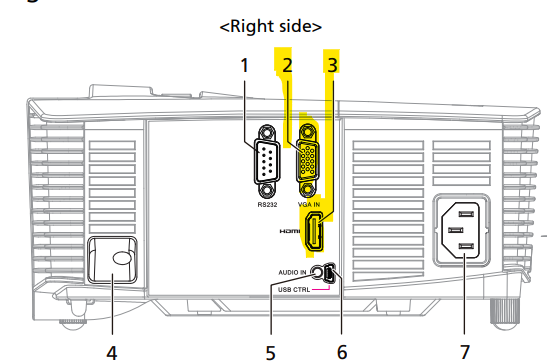
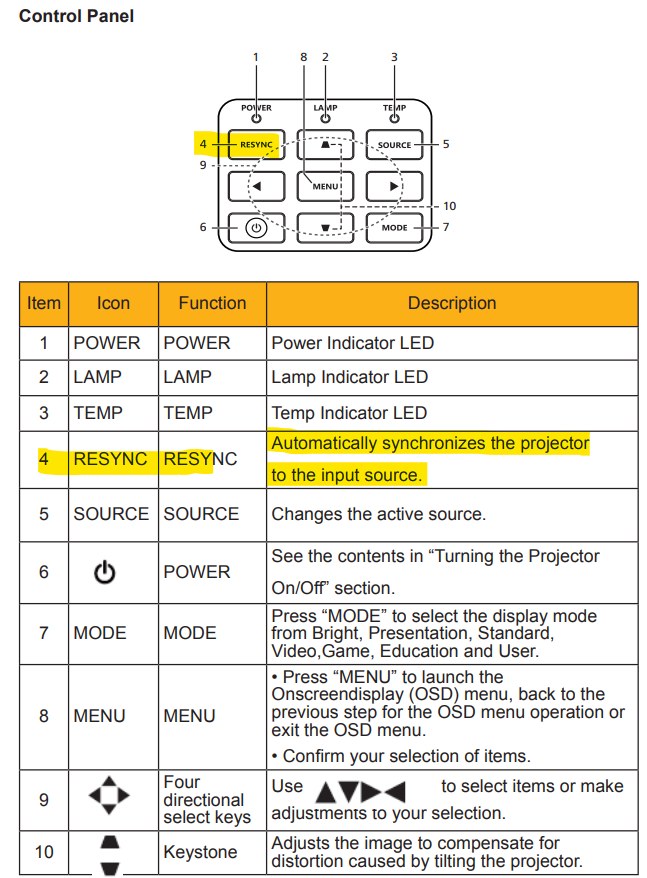
Your X115H projectors RESYNC Light being on > means that the "Automatically synchronizes the projector to the input source" is faulty like its either VGA cable or HDMI cable that you are connecting this projector to your laptop or desktop. If you are connecting with a HDMI cable, make sure that its a HDMI 1.4a type cable, as using any other cable could cause this fault. Otherwise and if that doesn't work, you will need to take this projector to Acer tech support in your country.
Check those cables as the projector is not connected to your laptop or desktop properly. See the X115H projectors manual and see the correct connection guide that Acer has a very extensive guide on. Good luck and hope this helps you out further.
If this answers your question and solved your query please "Click on Yes" or "Click on Like" if you find my answer useful👍

Re: my laptop's s/n and SNID are missing in the acer database
I am using acer aspire3 2023 model I used to download the drivers from the website but when I tried this time I faced the same problem of SNID not found
 RedblacK
Re: Predator Helios 300 PH 315-54-731M: Seeking Tips for Replacing and Maintaining Battery life
Hello Jerome
Keeping the laptop connected to AC power continuously does not shorten the life of a lithium‑ion battery. Modern batteries have an integrated circuit that cuts off charging once capacity reaches ~99.9%, so no overheating or damage occurs.
- A good quality battery lasts 4–5 years (≈1,000 full charge cycles) regardless of usage.
- Avoid very short charges and especially draining to 0% — those stress the cells most.
- Forget about “Calibration,” “Optimization,” or “80% charge limiting” features; they don’t improve health and can interfere with Windows ACPI drivers.
DIY replacement tips: Most users replace batteries themselves. The motherboard plug is delicate — don’t use pliers or force. Wiggle the corners gently with fingernails or a plastic fob. Once installed, perform one full charge cycle to register capacity (only needed after replacement or Windows reinstall).
Windows power management:
- Disable Fast Startup.
- Use the Balanced power plan and reset advanced settings to defaults.
- In Settings > System > Power & battery > Power mode, select Best Power Efficiency.
- Keep BIOS updated and install Windows 11 version 25H2, build 26200.8246.
One Full Charge Cycle procedure:
- Charge until the amber LED turns blue, wait 10 minutes, verify 100% in the taskbar meter.
- Unplug adapter, work until the laptop shuts down on its own (~5% left). Don’t press the power button; just close the lid.
- Plug in adapter, recharge until amber LED turns blue (~1 hour), wait 10 minutes.
- Boot into Windows and confirm the meter reads 100%.
That’s it — no repeated “calibration” is required. What matters most is battery quality and natural cycle count.
.
 Puraw
Puraw
Re: Predator Helios 300 PH 315-54-731M: Seeking Tips for Replacing and Maintaining Battery life
Yeah. Lost almost 90% of its original capacity. Even sitting on a shelf unused, batteries typically lose 10-20%l capacity per year. Not much you can do about that. Battery charge limiters do little or nothing to change this despite anecdotal claims on the internet. Not recommended.
Just let the battery charge back up to 100%. No harm to keep it plugged in fully charged. Use it once in a while. Try not to let it drain below about 5%—- the critical charge level —— before plugging it back in as this can cause damage and lose capacity faster if it happens too many times. Other than that, not much else needs to be done.
 JackE
JackE
Re: Predator Helios 300 PH 315-54-731M: Seeking Tips for Replacing and Maintaining Battery life
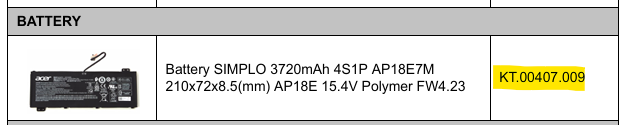
That battery report states that your old battery is shot and you need to buy a new battery (see below) for your 5 year old PH315-54 model Predator laptop as these batteries lifespan is between 3-4 years, but if used in a mobile environment where you recharged the battery often its less.
The below battery is the oem battery for the PH315-54 model listed by Acer in the PH315-54 Acer service guide, so use the highlighted Acer part number and search for a renowned Acer or preferably direct from Acer to purchase this exact battery. DO NOT buy a copy battery as they are not reliable and you will allot of faults with reading their charge levels.
If this answers your question and solved your query please "Click on Yes" or "Click on Like" if you find my answer useful👍
Re: Predator Helios 300 PH 315-54-731M: Seeking Tips for Replacing and Maintaining Battery life
Go to the elevated command prompt. Enter 'powercfg /batteryreport'. Then search for & open ' battery-report.html' in the c:\windows\system32\ sub-folder. Post screenshot of the first part of the report if possible. Jack E/NJ
JackE
Re: UEFI -- No bootable device found in Acer Aspire 3 A315-21-4808 laptop with Windows 10 (64-bit) version
Hi Hugger1
The Aspire 3 A315‑21‑4808 is limited by its 2016 AMD A4‑9120 platform and the last BIOS version 1.25 (June 2020). That firmware baseline does not include updated AGESA microcode for newer Windows 10 builds. Because of this, Windows 10 22H2 drivers will fail under UEFI mode and only boot in Legacy mode.
To avoid instability, forget about 22H2 and install a legacy Windows 10 release that matches the BIOS support window — for example version 1909 (Nov 2019). This build is fully compatible with BIOS 1.25 and avoids the AGESA driver issues seen with 22H2.
Puraw
Re: My laptop acer nitro 5 an517-54 crash game when plugged in
Hi yyyanhkhoa
Installing Windows 10 is unlikely to resolve this issue. The symptoms point to a hardware fault in the power rails module rather than a software or OS problem.
Please take the laptop to an Acer endorsed repair shop so they can check the power rails circuitry. This type of fault requires professional diagnosis and repair, and attempting software fixes will not address the underlying hardware issue.
Puraw
Re: Is there an ACER created system validation program for Predator PHN16-72?
You are welcome 😉
Puraw
Re: Uninstalled Predator Sense and it won't let me reinstall it. I have a Predator PH315 - 52
You need to install the PH315-52s exact Predator Sense Application last version: 3.00.3136 from this location HERE, otherwise it will not install or work. Do that as it should work 100%. First make sure that all PS apps are uninstalled through Control Panel > Uninstall a program and then reboot the computer and install the above PS version, so do that and let us know how it worked out.
If this answers your question and solved your query please "Click on Yes" or "Click on Like" if you find my answer useful👍





