





Best Of
Re: Intel Thunderbolt Control Center shows no available port on Nitro 5 AN515-58-545P
Hi Iwono
The Intel Thunderbolt Control Center is Intel’s add‑on utility, and it deserves criticism:
– It auto‑installs even on systems without Thunderbolt hardware, which misleads users.– It provides no diagnostics — if it doesn’t detect ports, it just sits blank.– It adds almost nothing beyond a pop‑up approval screen. Intel could have built this into Windows Settings instead of pushing a separate app.– That’s why many call it bloatware: it’s redundant, fragile, and confusing.
Now, to your actual plan: the Acer Nitro 5 AN515‑58‑545P does have a Thunderbolt 4 port. That means:
– It is not just USB‑C Gen2 + DisplayPort Alt‑Mode.– It carries PCIe lanes, so an eGPU will work with a proper enclosure (Razer Core X, Sonnet Breakaway, etc.).– Expect some performance loss versus a desktop GPU due to Thunderbolt bandwidth limits, but it’s fully supported.– Always connect your monitor directly to the GPU outputs on the eGPU enclosure for best results.
Bottom line: – Keep the Thunderbolt/USB4 driver.– The Control Center app is optional bloatware.– Your AN515‑58‑545P has Thunderbolt 4, so an eGPU is a valid and supported option.
 Puraw
Puraw
Re: RAM max capacity for Predator PHN16-71
The maximum RAM capacity for the Predator PHN16-71 depends on the specific CPU: it is officially up to 32GB for i7-13700H models, while some users report successful upgrades to 64GB (2x32GB) or even 96GB (2x48GB) for i7-13700HX or higher-end processors, though performance might be limited to lower speeds. For a guaranteed upgrade, 32GB is the official maximum, but 64GB is a common and achievable user upgrade for many configurations, especially with the i7-13700HX CPU.
For i7-13700H models
Official maximum: 32GB (2 x 16GB)
Speed: DDR5-4800MHz
For i7-13700HX models
Official maximum: 32GB (2 x 16GB)
User-reported maximum: 64GB (2 x 32GB) or higher is often achievable
Speed: Up to DDR5-5600MHz
Important considerations
CPU is key: The specific CPU in your model is the main factor. Check the model number and confirm with the CPU before purchasing RAM.
Dual-channel: For optimal performance, install identical RAM modules in pairs (e.g., two identical 32GB sticks) to run in dual-channel mode.
Compatibility checks: Use tools from memory providers like Crucial to check compatibility for your specific model.
Upgrade path: While some users have reported successful upgrades beyond the official specs, this may not be officially supported and could result in limited speed.
Installation: For models with the i7-13700HX, users have successfully upgraded to 64GB by letting the BIOS recognize the new RAM for several minutes after installation.
-----------------------------------------
If this answers your question & solved your query please "Click on Like" and then Yes "Answered".
 Axxo
Axxo
Re: V233H bd- How to connect the monitor? I did not get a signal.
The monitor worked using a VGA cable fine but for some reason the VGA cable and DP adapter didn't work even though it worked on a test monitor.
Thanks for reporting back. I suspect your D2A signal converter wasn't quite analog enough quality for the 2009 vintage monitor to properly interpret. A passive HDMI2DVI adapter might've done the job though.
 JackE
JackE
Re: Is aspire lite 14 compatible with airpods?
Thanks for the reply. It was helpful. But i also found out that i needed to do a long-press in the airpods button to start the pairing process :-p

Re: Predator 3000 PO3-655_H610 Can anyone show me a motherboard diagram highlighting where the connection to fit a SATA power cable is.
Your Predator 3000 PO3-665, like other recent Acer desktop models, uses a specialized ATX12VO power supply, which powers the drives from the motherboard rather than directly from the power supply unit (PSU). You will not find standard SATA power cables coming from the PSU itself.
Instead, power for SATA drives is supplied through specific connectors on the motherboard using a special cable.
Where to find the SATA power connector
Locate the power connectors on your motherboard. On some Predator Orion 3000 motherboards, these have been labeled as "ATX1," "ATX2," and "ATX3." Look for 6-pin or 4-pin connectors near the main SATA data ports.
Look for the special cable. The required cable for SATA power has a 6-pin or 4-pin connector that plugs into the motherboard on one end and standard SATA power connectors for your drive(s) on the other. Some systems may have one cable pre-installed, but you may need to purchase an additional one if you're adding a second drive.
Identify the Acer part number. The specific cable needed has an Acer part number, such as 50.SPXD3.001 for one HDD/ODD or 50.SPXD3.002 for two HDDs (for earlier models). You may need to call Acer technical support to determine the correct part number and order the cable.
How to install a new SATA drive
Mount the drive in one of the empty drive bays.
Connect the data cable from the new drive to one of the empty SATA data slots on the motherboard.
Connect the power cable. Plug the appropriate cable's motherboard-side connector into the designated motherboard power port and the SATA power connector into your new drive.
-----------------------------------------
If this answers your question & solved your query please "Click on Like" and then Yes "Answered".
Axxo
Re: Hi, how can i fix slow charging and buzzing noise when charging on my acer swift Go 14?
Hi, thank you for the reply, I checked acer sense and the laptop is set to full battery charging, not optimized battery charging. I also tried to use an air duster to clean the fans from the outside of the laptop, I didn't take anything apart, that didn't seem to do anything. I am thinking about now purchasing the charger you reccomended, but I think the one I already have might be a 100 watts charger, but I am unsure, perhaps it is damaged but it doesn't look damaged. I have attached an image of the battery pack of my charger so that you can help me clarify whether or not the one I already have is a 100 watts charger, you might have to zoom in on the image I have attached below. Thanks. Also, I am scared to use my current laptop charger in the meantime so can I use my usb c phone charger even if it charges the laptop slow, because that doesn't seem to make a buzzing noise when I plug it into my laptop? I will attach a few images of the charger I am currently using below. Thanks.
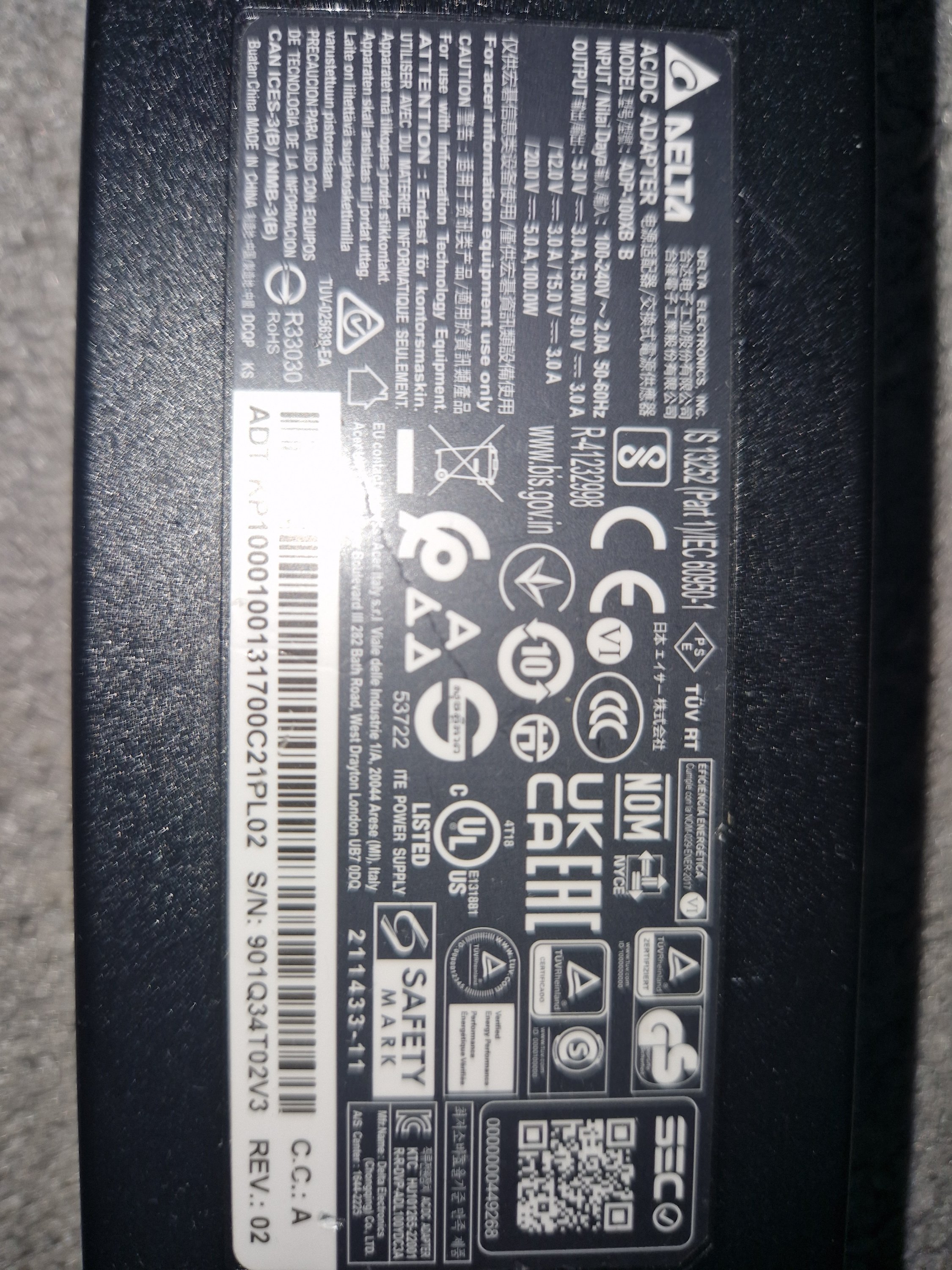
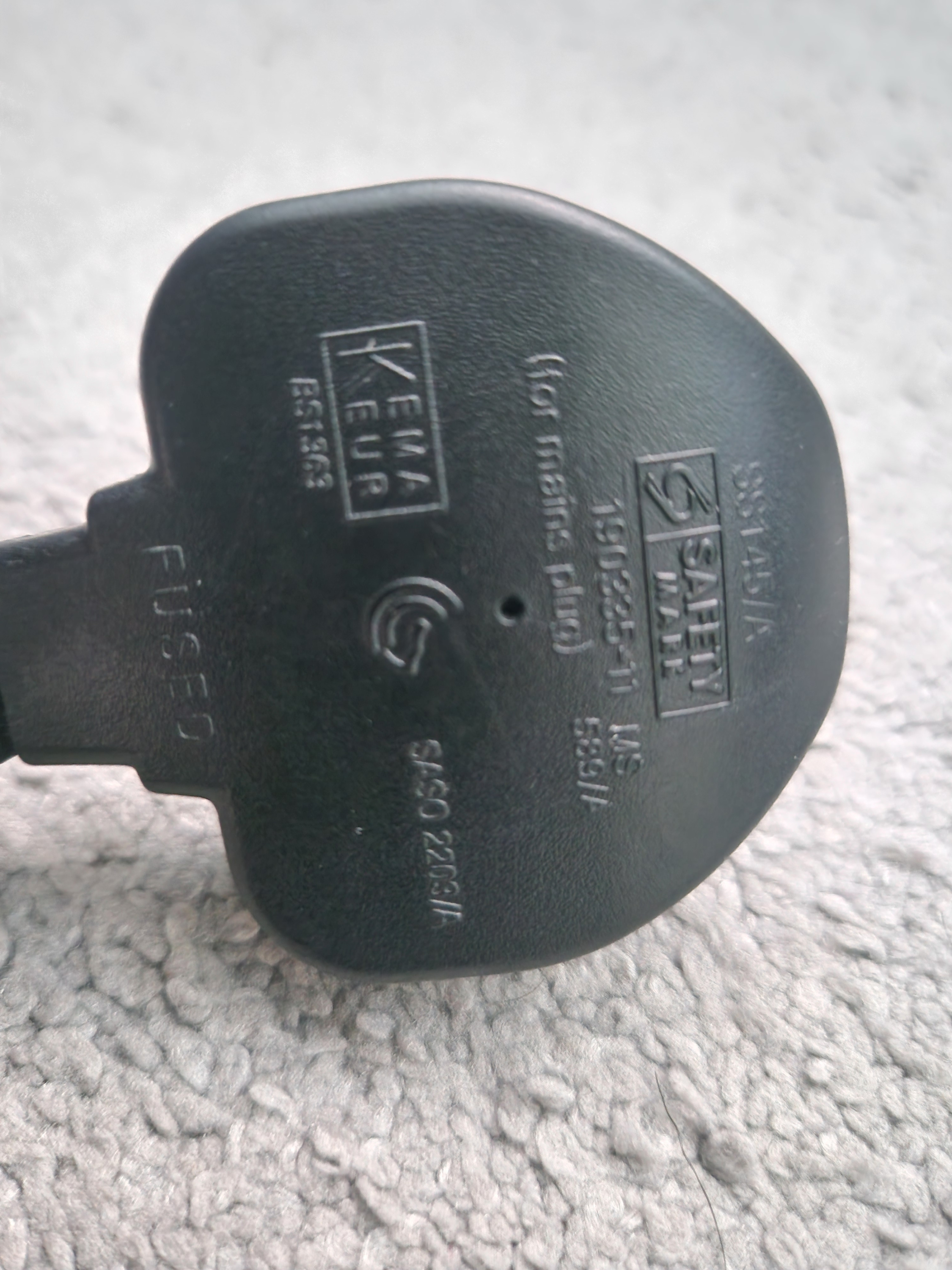

Hi, how can i fix slow charging and buzzing noise when charging on my acer swift Go 14?
Hi, there seems to be a problem that came up recently with my laptop. Firstly, when i plug in the charger, the laptop makes a buzzing noise and the screen starts lagging, as does the mouse and any on screen functions. Then the problem of slow charging arose the day after. My laptop had a battery of about 5% and i didn't notice so it switched off to save battery.I then plugged it in, the charging light came on and stayed on, I left it charging for about 45 minutes and when I turned it on the battery was 6%, which has never happened before. Can anyone help with this issue, and the buzzing noise and laggy screen when my charger is plugged in?
Re: Acer Nitro V15 ANV15-41-Experiencing a strange issue with the GPU fan.
Open the NitroSense app, switch the fan mode to Manual, and drag the GPU fan slider to its maximum setting. Apply the changes and observe whether the fan stabilizes and responds consistently. Additionally, make sure your system is running the latest BIOS version and updated drivers. Visit Acer’s official support page, enter your laptop model, and download the most recent BIOS and drivers. After installing them, restart your laptop to ensure all updates take effect
Click on "Yes" if it answers your question or Click on "Like" if you find my answer useful
 Diya1811
Re: Acer Nitro V15 ANV15-41-Experiencing a strange issue with the GPU fan.
There are several possible causes for strange GPU fan issues on an Acer Nitro V15 ANV15-41, including software bugs, dust buildup, or a faulty fan. Issues with BIOS updates have also been reported for this model.
Common solutions
Try these troubleshooting steps, moving from the simplest to the more complex.
Software and settings
Update BIOS and drivers: Ensure your system has the latest BIOS and GPU drivers, as these can resolve fan control issues. Many users on Acer Community forums have reported that the latest updates have fixed their problems with unstable fan behavior.
Use NitroSense: Open the NitroSense application and set the GPU fan to "Auto." If you are using a custom profile, switch back to Auto to see if the issue persists. You can download the latest version from the Acer support website.
Disable custom fan software: If you have installed any third-party fan control software, uninstall it to prevent conflicts with NitroSense.
Hardware:- Clean the fan: Dust and debris can clog the fan and vents, causing it to make noise or spin erratically. You can clean the fans and vents using compressed air. The most effective method is to open the laptop and clean the fans directly with a brush and compressed air.
Check for obstructions: Ensure the fan is not blocked by a loose wire or any debris inside the laptop.
Consider a hardware problem: If the fan is still making unusual noises after cleaning, the motor or bearings may be worn out and the fan may need to be replaced.
-----------------------------------------
If this answers your question & solved your query please "Click on Like" and then Yes "Answered".
Axxo





