





Best Of
Re: Need replacement CPU fan and charger upgrade options for Nitro 5 AN515-45 R2HE
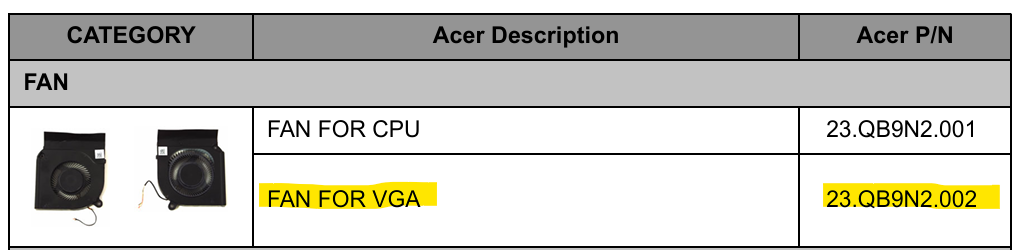
Get the Acer recommended cooling fans: CPU fan: Part Number: 23.QB9N2.001, GPU fan: Part Number: 23.QB9N2.002
23.QB9N2.002 Acer FAN.VGA (zandparts.com) and New Genuine Acer Nitro AN515-45 Laptop CPU Cooling Fan 23.QB9N2.001 | eBay
Click on "Yes" if it answers your question or Click on "Like" if you find my answer useful
 Diya1811
Re: How can I unlock the control key of my laptop? It's Aspire AL15-41P.
Restart your computer to clear any temporary glitches. Check for stuck physical keys like Ctrl, Alt, or Shift, as they can interfere even when using the on-screen keyboard. In Settings under Accessibility → Keyboard, turn off Filter Keys, Sticky Keys, and Toggle Keys to prevent conflicts. You can also enable the Touch Keyboard from the taskbar settings to use an alternative input method. Lastly, check for and install any available Windows updates to fix potential software bugs.
Click on "Yes" if it answers your question or Click on "Like" if you find my answer useful
Diya1811
Re: Need replacement CPU fan and charger upgrade options for Nitro 5 AN515-45 R2HE
Go to Zandparts as they have the original Acer VGA fan for your AN515-45 part #: 23.QB9N2.002 for €17.14 incl. VAT
If this answers your question and solved your query please "Click on Yes" or "Click on Like" if you find my answer useful👍

Re: Screen Flickering Issue - Games in Background and Desktop - Acer Predator Helios Neo 16 (PHN16-71, RTX 5070 Ti)
Thanks a million for your comments!
 brune93
Re: Screen Flickering Issue - Games in Background and Desktop - Acer Predator Helios Neo 16 (PHN16-71, RTX 5070 Ti)
Yes, just wait for Acer to release another bios as this laptop is only new and Acer does release updates for know issues like you are having.
If this answers your question and solved your query please "Click on Yes" or "Click on Like" if you find my answer useful👍





