





Best Of
Re: H243H - Blinking Orange Power Light, Can't get my Acer monitor to turn on again. What does the blinking light mean?
What is the Acer monitors model number, as they are all different and it depends how old it is. We can't give you an accurate answer if you don't give us those details.
This is the Power Indicator LED lights for the X34 curved monitor as an example, which is a fairly new model
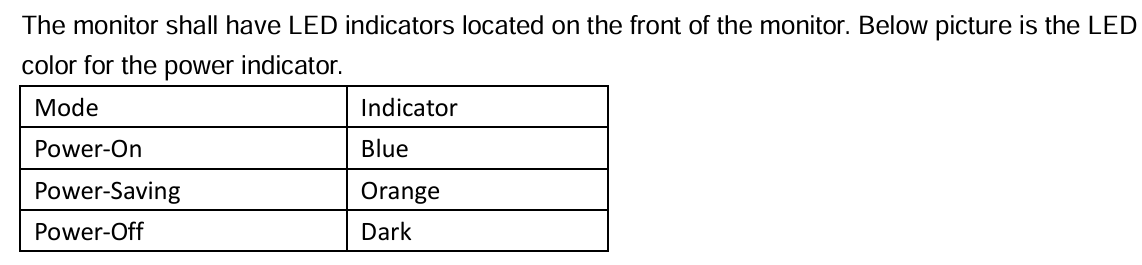
If this answers your question and solved your query please "Click on Yes" or "Click on Like" if you find my answer useful👍

Re: New windows11 computer won't recognize 2nd ACER monitor. Model EB222Q.
Get a HDMI splitter as that is the proper way to connect these two monitors and connect the splitter to the computers HDMI port and both monitors to the splitter. As the EB222Q is a 2017 50Hz - 75Hz refresher rate monitor can be connected with either a VGA HDMI splitter, which will give you two exact images on both monitor screens, as you will not be able to set these monitors up in a daisy chaining setup with a continual image on both monitors, Good luck and hope this helps you out further. .
If this answers your question and solved your query please "Click on Yes" or "Click on Like" if you find my answer useful👍
New windows11 computer won't recognize 2nd ACER monitor. Model EB222Q.
They were purchased in 2019 but support expired in 2022. I thought upgrading from the standard windows driver might help since both monitors are exactly the same. Right now I have one monitor on the VGA port and one on the HDMI. I have tried a number of different options but the computer only recognizes one. I am thinking also of getting an HDMI splitter but I'm afraid this wouldn't give the extended monitor capability. Help!!
 Rhoodm





