





Best Of
Re: Does Acer Swift Go 14 AI SFG14-01-X4DG support facial recognition and fingerprint?
Yes, the Acer Swift Go 14 AI (SFG14-01-X4DG) supports both fingerprint recognition (via a sensor on the power button) and facial recognition (using its IR webcam with Windows Hello) for secure login.
Here's a breakdown:
Fingerprint Recognition:
The laptop is equipped with a fingerprint sensor, allowing for quick and secure access to your device by simply touching the power button.
Facial Recognition:
It features a 1080p FHD IR webcam that works with Windows Hello to enable facial recognition for login. This IR camera is essential for the security and functionality of Windows Hello's biometric features.
-----------------------------------------
If this answers your question and solved your query please "Click on Like" and then Yes "Answered".
 Axxo
Axxo
Camera QHD User Facing (Swift SFG14-01) does not function at all.
My camera QHD User Facing on Acer Swift SFG14-01 cannot produce any image at all or does not work well. The camera is still found there in Device Manager, too. I'd already updated it several times. Does anyone help me solve the issue? Thanks so much.

Re: Camera QHD User Facing (Swift SFG14-01) does not function at all.
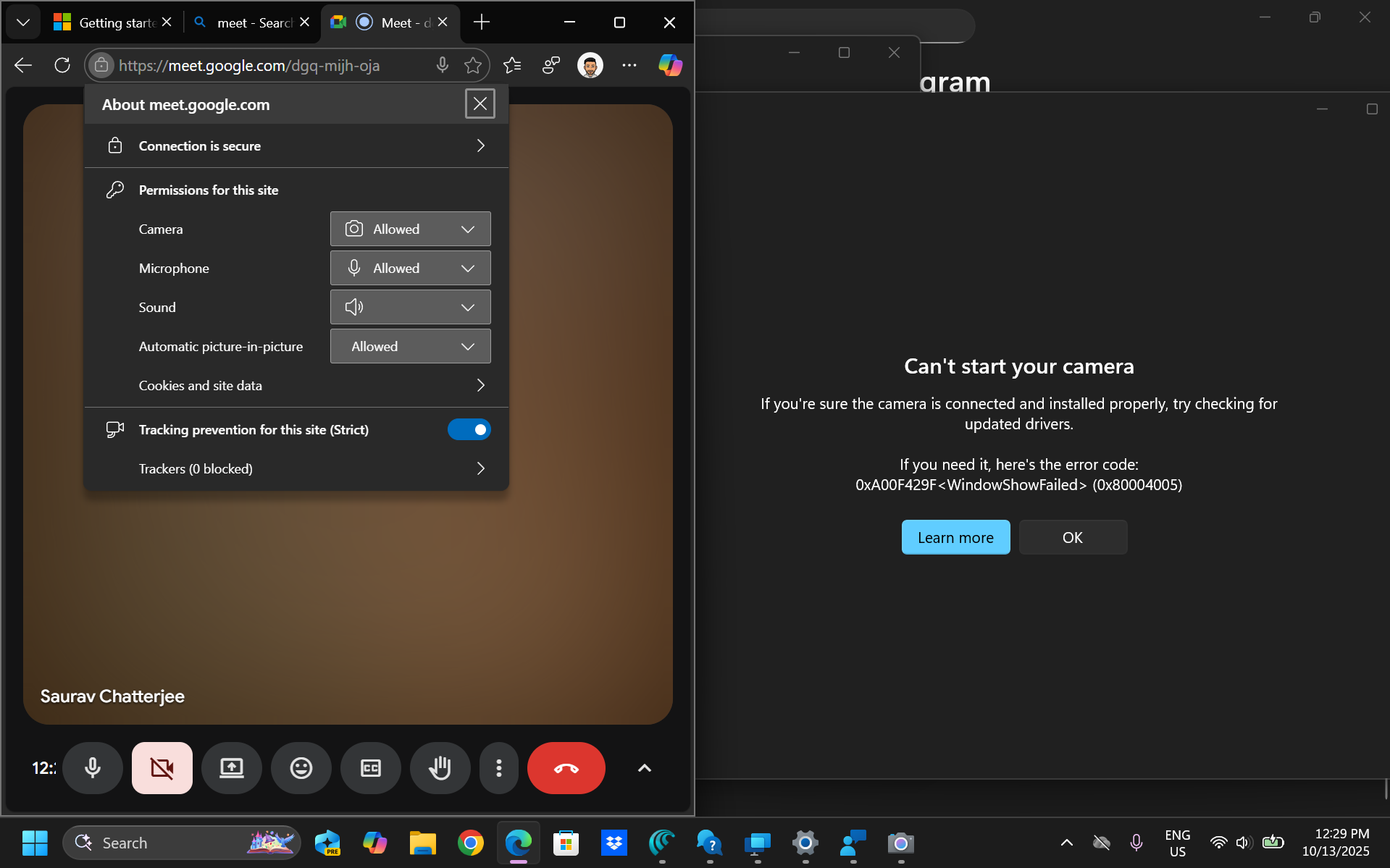
I used the camera on September 20th. Then my laptop got a windows update, i went ahead with it after that it stopped working. I've also raised a ticket with Microsoft, will keep you posted if I get a solution. Meanwhile, please let me know if you found the solution already

Re: Camera QHD User Facing (Swift SFG14-01) does not function at all.
It’s a driver issue. Had the same issue. Found the solution here and had to manually delete and reinstall drivers.
 JVL01
JVL01
Re: Acer Swift 14 AT (Snapdragon x Elite Swift 14-11T) Camera Not Working in apps, but face unlock still works
Found the solution here.
It is obviously a driver issue because I sent my laptop in to Acer for repair as I could not get the camera to work. They fixed it for me, and I reset the laptop in case upon getting it back just for peace of mind. The camera stopped working again. I followed the steps in the link and it started to work again. Its not perfect because face unlock still does not work but at least the main camera is back.
JVL01
Re: My newly bough Acer nitro 15 isn't charging
Hi BenryBenzo
First try the EC (Embedded Controller) reset routine:
- Shut down the laptop completely.
- Disconnect the AC adapter.
- Hold the Power button pressed for about 30 seconds.
- Reconnect the adapter and try to power on again.
Do not open the back of the laptop at this stage.
If it still does not charge, it may have overheated. Leave it powered off for a few hours (or overnight) and then try again.
If no results, the next step is to take the laptop to Acer Services in your country or file a “Repair under warranty” request online with Acer Support and wait for their instructions by e‑mail.
 Puraw
Puraw
Re: Nitro AN515-45 randomly getting to restart after sleep
Hi Cenbow
A good way to isolate this restart‑after‑sleep issue is to test in Safe Boot with Base Video enabled via msconfig.exe. After applying that setting, put the system to sleep by briefly pressing the power button (<1 second).
- If the system does not restart in this mode, the problem is likely tied to the Nvidia GPU driver.
- Check Event Viewer for errors logged at the restart time; Nvidia references there would confirm it.
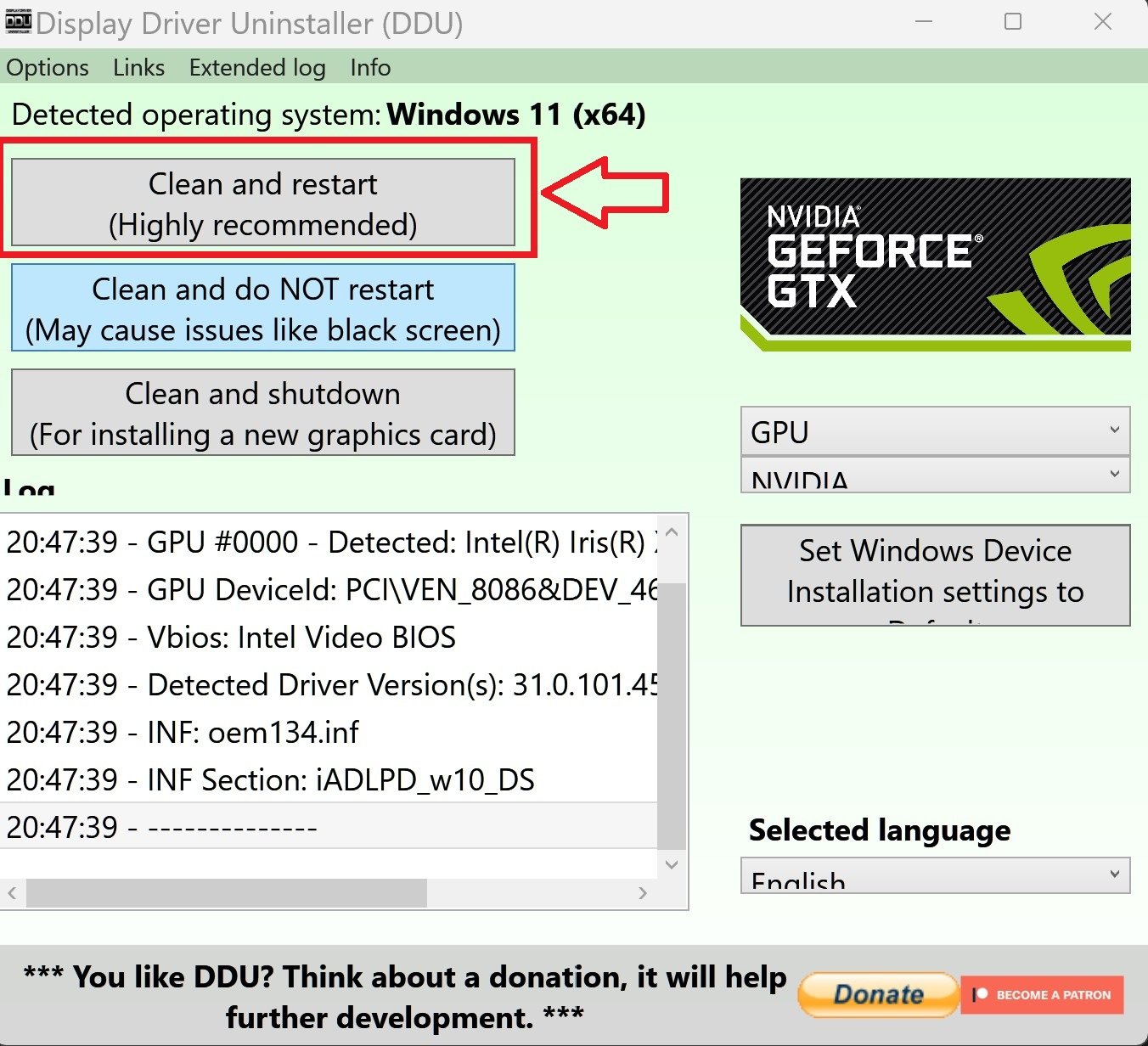
- To properly replace the Nvidia driver, use DDU (Display Driver Uninstaller) in Safe Mode (not Safe Boot). Select the Clean and restart option.
- Important: once finished, return to
msconfig.exeand disable Safe Boot, then click Apply. Otherwise, the system will remain stuck in a Safe Boot loop.
This process rules out driver corruption as the cause and ensures a clean reinstall of the GPU driver. https://support.microsoft.com/en-us/topic/how-to-perform-a-clean-boot-in-windows-da2f9573-6eec-00ad-2f8a-a97a1807f3dd
https://support.microsoft.com/en-us/windows/windows-startup-settings-1af6ec8c-4d4a-4b23-adb7-e76eef0b847f
 Puraw
Puraw
Re: Problem with Acer Technical Service in Turkey
Hello @mehmeterts0,
I'm sorry for any inconvenience this may have caused. Please check your private messages so I can assist you with this issue.
Regards,
William-Acer
Community Moderator

Re: black screen occassionally blinks while using the Aspire 16 laptop
Hey, taking it to the service center would be the best option.

Re: black screen occassionally blinks while using the Aspire 16 laptop
The occasional black blinking on an Acer Aspire 16 laptop is likely caused by a loose internal display cable, a software or driver issue, or a problem with the graphics card or RAM. To troubleshoot, try a power reset, use the Win + Ctrl + Shift + B keyboard shortcut, and test with an external monitor to rule out hardware failure. If the problem persists, check for driver and malware issues, or consider hardware problems like loose RAM.
Software and driver solutions:-
Power Reset: Turn off the laptop, unplug the AC adapter, and then press and hold the power button for 15 seconds to discharge any residual power. Then, turn it back on.
Graphics Driver Reset: Press Windows + Ctrl + Shift + B simultaneously to reset the graphics driver. The screen may flicker or go black momentarily before the display is restored.
Update or Reinstall Drivers: Outdated or corrupt graphics drivers can cause black screen issues. Go to Device Manager and update your display adapter driver. If that doesn't work, try uninstalling and reinstalling the driver.
Check for Malware: Run a full system scan with your antivirus software to rule out malware as the cause of the problem. If still the problem persists, its better to return it back to the retailer and get a New replacement laptop.
-----------------------------------------
If this answers your question & solved your query please "Click on Like" and then Yes "Answered".
Axxo





