





Best Of
Re: Just got an Acer Aspire XC-1860 with 8GB ram. Should I Uninstall the expressed VPN that comes with the PC?
Yes you can. Feel free to remove all useless apps from settings

Re: How to fix a glitch on my home screen? (Model: Acer Aspire A715-79G)
To fix a glitch on your Acer Aspire A715-79G home screen, the issue is likely with the graphics driver or a software conflict. It is unlikely to be a hardware problem, especially if the glitch doesn't appear in Safe Mode.
Here is a step-by-step approach, from easiest to most involved:-
Step 1: Check for software conflicts
A flickering or glitching screen can be caused by a recently installed application.
Open the Task Manager by pressing Ctrl + Shift + Esc.Watch the screen. If Task Manager flickers along with everything else, the issue is likely the graphics driver.
If Task Manager does not flicker, the problem is an incompatible app. The best course of action is to uninstall recently installed applications one by one to find the culprit.
Step 2: Update your graphics drivers
If Task Manager flickers along with the rest of your screen, the graphics driver is the probable cause.
Press Windows + I to open Settings.
Navigate to Windows Update, then click Check for updates. Any available graphics driver updates will be installed automatically.For a more specific update, open the Device Manager by right-clicking the Start button.
Expand Display adapters, right-click your graphics card (e.g., NVIDIA, Intel), and select Update driver.
Choose Search automatically for updated driver software.
Step 3: Roll back your graphics driver
If the issue started after a recent update, rolling back the driver can resolve the problem.
In Device Manager, right-click your graphics card and select Properties.
Navigate to the Driver tab and click Roll Back Driver, if available.
Step 4: Perform a clean reinstallation of the graphics driver
If rolling back doesn't work, a complete removal and reinstallation can fix corrupted drivers. For this, it is best to use a specialized utility like Display Driver Uninstaller (DDU).Download Display Driver Uninstaller (DDU) from a trusted site like Guru3D.
Download the latest graphics driver for your specific card (NVIDIA or Intel) from the manufacturer's website.
Restart your computer into Safe Mode.
Press Windows + I > System > Recovery.
Click Restart now under "Advanced startup."
Once restarted, go to Troubleshoot > Advanced options > Startup Settings > Restart.
Press 4 or F4 to enter Safe Mode.
Run DDU, select your GPU brand, and choose Clean and restart.
After restarting, install the fresh driver you downloaded earlier.
-----------------------------------------
If this answers your question & solved your query please "Click on Like" and then Yes "Answered".
 Axxo
Axxo
Re: Upgrading Storage and RAM, does my Acer Nitro 5 (AN515-58) laptop support an extra SSD slots?
Here's the memory specification details for both DD4 and DDR5
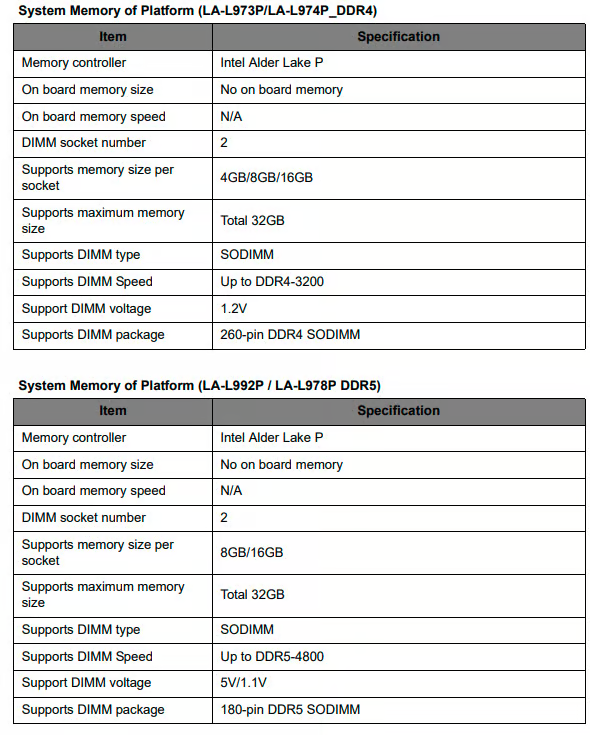
Click on "Yes" if it answers your question or Click on "Like" if you find my answer useful
 Diya1811
Re: Upgrading Storage and RAM, does my Acer Nitro 5 (AN515-58) laptop support an extra SSD slots?
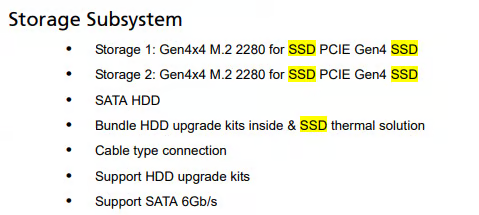
Click on "Yes" if it answers your question or Click on "Like" if you find my answer useful
Diya1811
Re: Where is USB 4 in Aspire A15-61M? The specifications indicate USB 4 support.
Hi Niko1aich
USB4 on AMD systems is the functional equivalent of Intel’s Thunderbolt 4. Through the USB‑C port it provides:
- Power Delivery up to 100 W (20 V/5 A), so you can charge the laptop with a compliant USB‑C charger.
- DisplayPort Alt Mode for video output, allowing connection to an external monitor via USB‑C to DisplayPort or USB‑C to HDMI adapters.
- Data transfer rates up to 40 Gbps, matching Thunderbolt 4.
- Backward compatibility with USB 3.x and USB 2.0 devices.
In Windows Device Manager you may only see “USB 3.x controllers.” That is normal — the USB4 functionality is managed by the chipset and firmware, and Windows does not always label it explicitly.
 Puraw
Puraw





