





Best Of
Re: Which cooling Pad should I buy for Acer Aspire 3 A315-23(Ryzen 3 3250 U)?
Hi Pratyush_11
These 6-fan cooling pads are all good: Amazon.in Bestsellers: The most popular items in Portable Computer Cooling Pads
 Puraw
Puraw
Re: Nitro ANV15-41 Upgradable RAM Pair or seperate?
Hi noobenater01
The key point is that the CPU’s memory controller sets the ceiling. On the Acer Nitro V 15 ANV15‑41 with Ryzen 7000‑series mobile CPUs (e.g. Ryzen 5 7535HS, Ryzen 7 7735HS), AMD specifies DDR5‑4800 MT/s as the officially supported speed.
- If you install DDR5‑5200 modules, they will usually downclock to 4800 MT/s, since that’s what the CPU supports by default.
- Some BIOS revisions may allow higher speeds via EXPO/OC profiles, but Acer generally locks laptops to the JEDEC‑standard speed for stability.
- So in practice, whether you buy 4800 or 5200 MT/s sticks, the system will run them at 4800 MT/s.
That’s why it doesn’t really matter which kit you choose — the CPU will cap it. The important thing is to buy a matched kit (2×8 GB or 2×16 GB) so you get dual‑channel performance and guaranteed compatibility.
Puraw
Re: Predator Triton 17X (PTX17-71) - Semi-frequent microfreezing/stuttering issue
Start by updating the BIOS and chipset drivers from Acer’s official support site to ensure your system firmware is current. Next, switch your power plan to “High Performance” via Control Panel to prevent power-saving features from interrupting system responsiveness. You should also run a system file check by opening Command Prompt as administrator and executing sfc /scannow to detect and repair any corrupted system files. Finally, monitor your laptop’s thermals to ensure temperatures are within safe limits and that airflow isn’t obstructed
Click on "Yes" if it answers your question or Click on "Like" if you find my answer useful
 Diya1811
Re: acer iconia tab a10-not charging, it's show the red battery symbol when you power on and the knocks off. any help
Start by using the original charger and cable, and plug into a reliable power outlet. Inspect the charging port for dust or debris and gently clean it with a soft brush. While charging, try a forced restart by holding the power button for 20–30 seconds. You can also try charging via a computer USB port, which delivers a slower but steady charge. Avoid opening the device or using sharp tools, as this can void your warranty. Since your tablet is only two months old, contacting Acer support or visiting an authorized service center is the safest next step if these measures don’t work.
Click on "Yes" if it answers your question or Click on "Like" if you find my answer useful
Diya1811
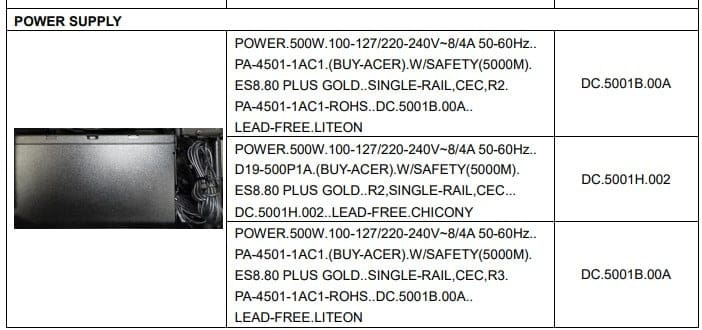
Re: PSU failure on Acer Predator Orion 3000 (PO3-640), need replacement advice
Below are the types of OEM PSUs that Acer fits to this desktop and if you want to upgrade the GPU that required higher power then you need a higher-powered PSU then you have to fit the same type of PSU as below. Below are safest since it's official replacement.

Games Crashing in new Acer Nitro V ANV15-52 Intel Core i5 13th Gen 13420 RTX 5050
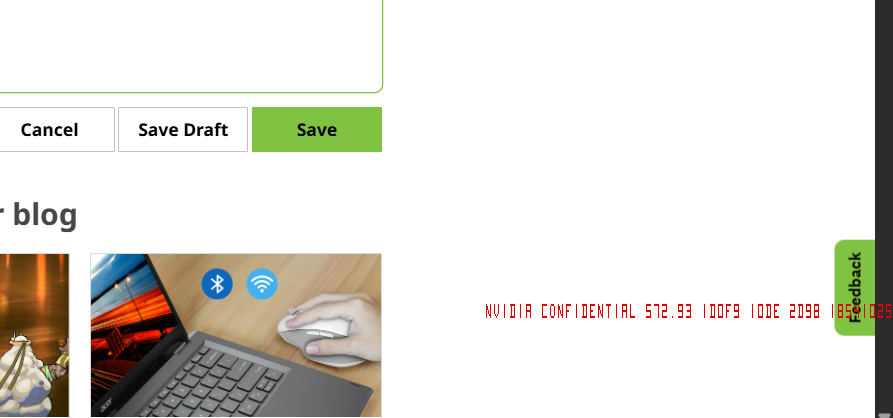
I have recently bought Acer Nitro V 15 Intel Core i5 13th Gen 13420H (16 GB/512 GB SSD/Windows 11 Home/8 GB Graphics/NVIDIA GeForce RTX 5050) ANV15-52 Gaming Laptop (15.6 inch, Obsidian Black, 2.113 Kg) all games are keep crashing after start play the games. I can only play games with acer provided driver in the site and i see red color text in screen when gpu is used
[Edited the thread to add model name to the title]

Re: black screen occassionally blinks while using the Aspire 16 laptop
Hi katelynrose,
I recommend taking it back to the retailer and demand a new unit, this should not be happening to new laptop.
Puraw
Re: Predator Orion 7000 (PO7-660) - no SATA mode settings in BIOS
You have created create USB in GPT partition using rufus software to get ssd recognized. As for sata mode, press CTRL+S in bios to unlock it





