
How do I enable or disable the OSD lock on my Acer monitor?
Some Acer monitors include a feature that allows you to lock your on screen display menu so it does not activate when buttons are pressed on the monitor. You can use the instructions below to turn the on screen display lock on or off.
How to Enable the OSD lock
- Press Menu to open the OSD
- In the OSD menu, change the OSD Lock setting to On.
How to Disable the OSD lock
Method 1:
- Locate the buttons along the bottom edge of the monitor, then press and hold button 2 (the second from the right) for five seconds.
- You should see a message "OSD Unlocked" when the lock is turned off.
Method 2:
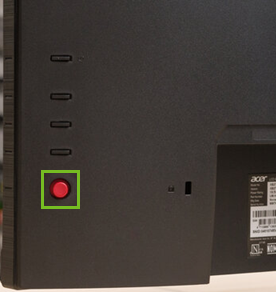
- Press in and hold the joystick button on the back of the monitor for 5 seconds.
- The message OSD Unlock message will be displayed in the middle of the screen.